Table of Contents
Encrypt Decrypt Text Tool | Free Secure Online Message Cipher
Welcome to our Encrypt Decrypt Text Tool, the free, browser-based solution to secure your private messages with AES-256 encryption.
Whether you need to encrypt sensitive notes or decrypt previously encoded text, this Encrypt Decrypt Text Tool works 100% locally on your device, with no server storage required.
First, plaintext text exposure risk is the most common threat. Ordinary text content is fully readable by network administrators, third-party trackers, and hackers during transmission and storage.
Public network environments, including office Wi-Fi and public hotspot connections, make unencrypted text extremely vulnerable to interception and data theft.
Second, traditional encryption solutions have high usage thresholds. Professional encryption software requires local installation, complex parameter configuration, and professional cryptography knowledge.
Ordinary users cannot quickly master operation steps, and most paid encryption tools charge expensive subscription fees, which is not friendly for individual users and small teams.
Third, most online encryption tools have hidden data security risks. Many web-based text encryptors upload user input content to remote servers for processing.
This means sensitive information such as passwords, personal identity details, and business secrets will be stored on third-party servers, triggering data leakage and privacy violation risks. This is exactly why our Encrypt Decrypt Text Tool adopts local processing to protect your privacy.
Fourth, fragmented tool functions reduce work efficiency. Most online tools only support single encryption or decryption functions. Users need to switch multiple websites to complete full data processing, which wastes time and disrupts workflow continuity.
If you need complementary tools for text encoding and obfuscation in your workflow, check out our Base64 Encoder/Decoder Tool, which works seamlessly with this Encrypt Decrypt Text Tool to keep your sensitive data secure.
2. What Is Our Encrypt/Decrypt Text Tool?
Our Encrypt Decrypt Text Tool is a lightweight, browser-based free web utility designed for full-end user text privacy protection. Built with military-grade AES-256 encryption algorithms, this Encrypt Decrypt Text Tool realizes one-click text encryption and decryption, covering all daily private text protection scenarios.
Different from traditional encryption tools that rely on server computing, this Encrypt Decrypt Text Tool adopts 100% local browser processing logic.
All text encryption, decryption, and algorithm calculation operations run on the user’s local device without any data upload, server storage, or third-party data collection. It completely eliminates the risk of sensitive data leakage caused by server-side storage.
This all-in-one tool integrates dual core functions: plaintext encryption and ciphertext decryption. Users can switch working modes with one click, set custom security keys, and process unlimited-length text content including English, Chinese, numbers, and special symbols.
It supports all mainstream device access, including computers, mobile phones, and tablets, with no software installation, no registration, and no login requirements.
The encryption core is built on the widely recognized AES-256 standard, which has been approved by the U.S. National Institute of Standards and Technology (NIST) for top-secret government communications.
Learn more about the AES standard
3. Core Advantages of the Encrypt Decrypt Text Tool
3.1 Zero Server Data Processing & Absolute Privacy Protection
The biggest advantage of this Encrypt Decrypt Text Tool is local offline encryption processing. Unlike most competing online tools that transmit user data to cloud servers, all calculation processes are completed locally in the user’s browser. No text records, no key information, and no operation logs are saved on any remote server, ensuring absolute data privacy.
3.2 Military-Grade AES-256 Encryption Algorithm
The tool adopts the internationally recognized AES-256 encryption standard, which is widely used in government financial systems, enterprise confidential platforms, and global security software. Equipped with PBKDF2 key derivation technology and high-iteration encryption rules, it effectively resists brute-force cracking and dictionary attacks, greatly improving the security of encrypted text.
3.3 One-Click Dual Mode & Zero Usage Threshold
It abandons the fragmented design of separate encryption and decryption tools. The integrated mode switching function allows users to complete encryption and decryption operations on a single page. The minimalist visual interface requires no professional cryptography knowledge. Novice users can master all operations in 10 seconds, realizing true zero-learning-cost use.
3.4 Completely Free & Unlimited Commercial Use
This web tool is permanently free for all individual users, enterprise employees, and small business teams. There are no function limits, no traffic restrictions, no advertisement pop-ups, and no hidden payment charges. Users can process unlimited text content and use it for personal privacy protection, business document encryption, and commercial project scenarios.
3.5 Full-Device Compatibility & Instant Response
Adaptive responsive design supports all mainstream browsers including Chrome, Edge, Firefox, and Safari. It runs smoothly on desktops, Android mobile phones, and iOS devices. The built-in lightweight code architecture ensures millisecond-level encryption and decryption response speed without lag or delay.
4. Step-by-Step Guide: How to Use the Encrypt Decrypt Text Tool
4.1 Encrypt Private Text
Step 1: Open our Encrypt Decrypt Text Tool page on any browser.
Step 2: Switch the working mode to Encrypt (default mode).
Step 3: Paste or type the sensitive plaintext text that needs encryption into the input text box.
Step 4: Set a custom secure encryption key (it is recommended to use a high-strength password combining uppercase and lowercase letters, numbers, and symbols).
Step 5: Click the Encrypt Text button, and the system will automatically complete local encryption.
Step 6: Copy the generated ciphertext and save or share it safely.
4.2 Decrypt Encrypted Ciphertext
Step 1: Switch the tool mode to Decrypt.
Step 2: Paste the previously encrypted ciphertext into the input box.
Step 3: Enter the exact encryption key used for text encryption (wrong keys cannot restore plaintext).
Step 4: Click the Decrypt Text button to restore the original readable text instantly.
Step 5: Copy and export the decrypted plaintext for viewing and use.
To ensure your encrypted data stays secure, it is critical to use a strong, unpredictable encryption key. For help creating complex, unbreakable keys that meet modern security standards, you can use our Random Password Generator to generate high-strength encryption keys automatically.
5. Tool Functional Code & Complete Configuration Files
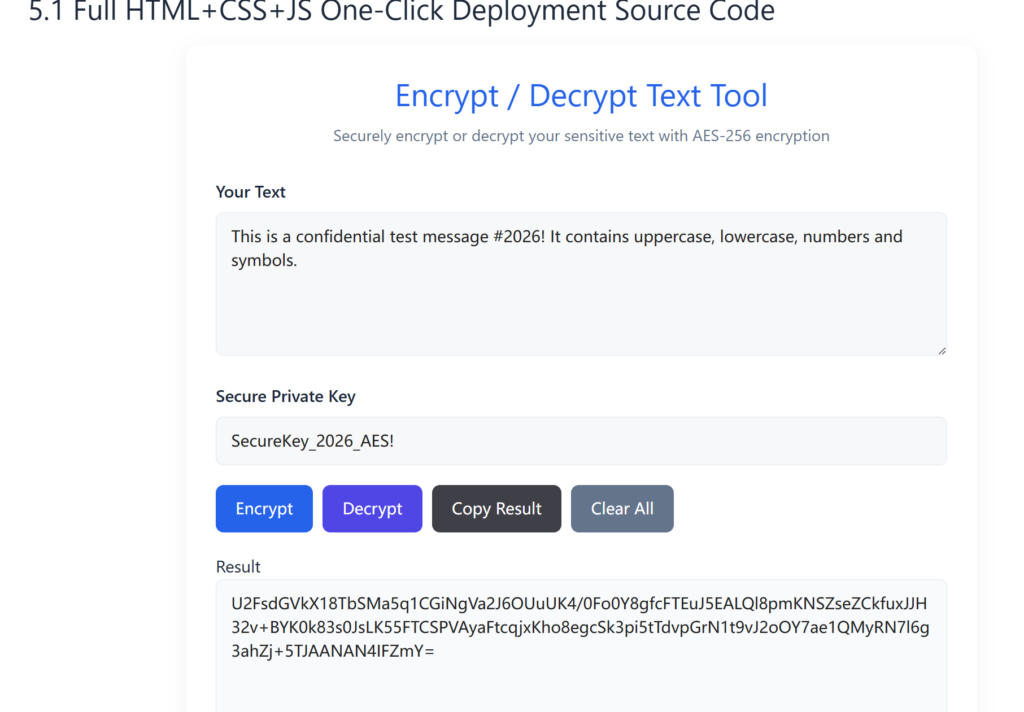
5.1 Full HTML+CSS+JS One-Click Deployment Source Code
Encrypt / Decrypt Text Tool
Securely encrypt or decrypt your sensitive text with AES-256 encryption
5.2 Required Deployment Configuration Files
1. Crypto-JS Dependency File
The tool loads the official Crypto-JS 4.2.0 CDN by default. This library supports the AES-256 encryption core algorithm, requires no local downloads, and is both stable and secure.
2. Nginx Rewrite Rules (for WordPress)
If you are using WordPress with pretty permalinks, add the following rule to your Nginx configuration to ensure the tool page loads correctly:
“`nginx
location ~* /encrypt-decrypt-text-tool/ {
try_files $uri $uri/ /index.php;
}
3. Robots.txt Supplementary Rules
Add these rules to your robots.txt file to allow search engines to crawl the tool page while blocking sensitive admin areas:
User-agent: *
Allow: /encrypt-decrypt-text-tool/
Disallow: /wp-admin/
Disallow: /wp-login.php
4. Sitemap.xml Inclusion Rule
Add the following entry to your website sitemap to help Google index the tool page:
<url>
  <loc>https://aisubtools.xyz/encrypt-decrypt-text-tool/</loc>
  <lastmod>2026-06-08</lastmod>
  <changefreq>weekly</changefreq>
  <priority>0.8</priority>
</url>
5.3 Deployment Notes
- All code runs purely on the front end, with no backend database or server-side processing required.
- Compatible with all WordPress static page environments, as well as standalone HTML site deployments.
6. Conclusion
The Encrypt Decrypt Text Tool solves the core pain points of ordinary users in text privacy protection, including data leakage risk, high tool threshold, and single function.
With local browser AES-256 encryption, zero data upload, one-click dual-mode operation, and full-device compatibility, it becomes the most practical free text encryption and decryption utility for personal users and small teams.
Whether you need to encrypt private chat records, protect business confidential documents, or decrypt historical ciphertext data, this Encrypt Decrypt Text Tool can complete all operations efficiently and safely without any cost or complicated settings.
To learn more about best practices for securing sensitive text online, you can refer to this guide from Electronic Frontier Foundation (EFF) on protecting your digital privacy.