Table of Contents
Common Password Problems & Solutions
Our Free Random Password Generator Tool helps you avoid costly online security risks caused by weak passwords.
Every year, over 80% of online data breaches trace back to weak, reused, or predictable user passwords, according to global cybersecurity statistics. Millions of internet users fall into three typical password traps every single day:
- Overly simple self-made passwords: Most people create passwords with birthdays, pet names or sequential numbers like
123456, which hackers crack within seconds via dictionary and brute-force attacks. - Cross-account password reuse: Using one identical password across social media, online banking, shopping platforms and work emails means one leaked credential unlocks all your digital accounts.
- Difficulty memorizing complex passwords: Trying to craft unique complicated passwords manually drains mental energy, pushing users back to lazy, unsafe password habits.
Our AI Subtool Free Random Password Generator Tool fixes all these issues perfectly. T
his free browser-based utility instantly generates unpredictable, cryptographically secured high-strength secure passwords for every online service: social accounts, personal email, online banking, enterprise admin panels, home Wi-Fi and backend system credentials.
All password computation runs 100% locally inside your browser, which means your generated sensitive credentials never get uploaded to any remote server or logged in our database, eliminating data leakage risks from third-party tool provide。
To explore the full set of functions, visit our AI Subtool homepage
Online Free Random Password Generator Tool Introduction
Built on industry-standard cryptographically secure random number algorithm (CSPRNG), our Free Random Password Generator tool stands out from dozens of unreliable online password tools that use insecure pseudo-random functions like Math.random(). Here are core advantages of our tool on aisubtools.xyz:
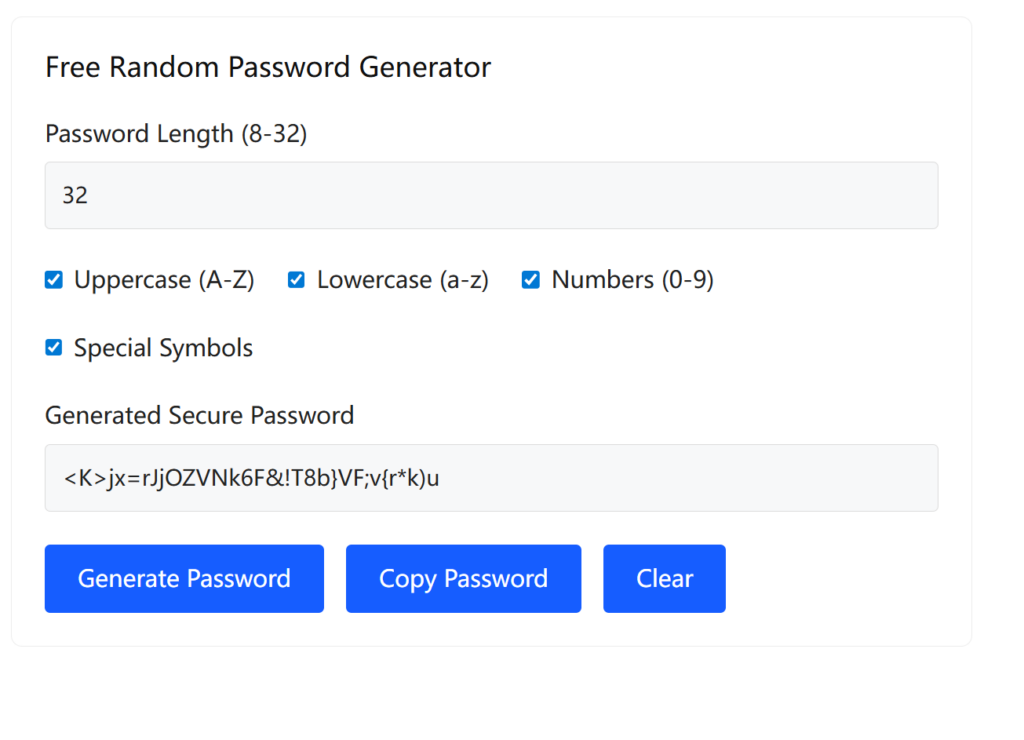
Key Tool Features
✅ Full Customizable Character Combination: Toggle 4 core character sets freely – lowercase letters(a-z), uppercase letters(A-Z), numeric digits(0-9), special symbols(!@#$%^&*~). Pick single or mixed groups matching your website’s password rules.
✅ Flexible Password Length Control: Adjust password length from 4 to 64 characters. Follow official NIST & CISA cybersecurity guidelines: 16+ characters for banking/email core accounts, 12+ characters for regular daily apps.
✅ Advanced Optimization Options: One-click exclude confusing similar characters (0/O, l/I/1) to avoid input typos; disable duplicate consecutive characters for enhanced random entropy.
✅ Instant Copy & Regenerate: One tap copy generated password to your clipboard, click regenerate anytime for brand-new unique random passcodes without page refresh.
✅ 100% Free & No Limitations: Zero registration, no hidden paywall, unlimited password generation times, works offline even without stable internet after page loading completes.
Unlike many competitors storing generated passwords on backend servers, our local-only processing architecture guarantees absolute privacy: no network request sends your password out of your device at any step.
Our privacy framework fully complies with rules laid out in the NIST Official Password Security Standard, the globally recognized benchmark for cybersecurity password regulations.
How to Use our Free Random Password Generator Tool
Master our Use our Free Random Password Generator Tool within 3 simple steps for new secure credentials:
- Open our Use our Free Random Password Generator Tool page from AI Subtool’s Online Tools navigation menu.
- Configure your preferred parameters: set target password length, tick needed character types, turn on “exclude similar characters” if required.
- Hit the Generate button to create your unique high-strength secure password, click copy icon to save it to clipboard directly.
Workflow for Updating Old Weak Account Passwords
- Log into your target account’s security setting page and find “Change Password” option.
- Open our free random password generator tool tab to customize and generate a new exclusive passcode.
- Paste copied new password to update your account credential, then store the new password inside your preferred password manager like Bitwarden or 1Password.
- For detailed secure storage guidance, you can refer to content published on the Bitwarden Official Site.
Key Advantages of Our Free Password Generator Tool vs Traditional Password Tools
| Comparison Item | Our Free Password Generator Tool | Traditional Password Tools |
|---|---|---|
| Data Privacy | Generate passwords locally in your browser, never upload data to servers, no risk of password leakage. | Data will be transmitted to remote servers; your passwords may be recorded or leaked. |
| Usage Cost | 100% free forever, no registration, no usage limits, no hidden charges. | Free versions have strict limits; advanced secure features require paid subscriptions. |
| Installation | No download or installation needed, works on all browsers across phones, PCs and tablets. | Need to install desktop software or mobile apps, takes up device storage space. |
| Customization | Freely set password length, character types, exclude confusing ambiguous characters. | Only fixed preset modes, few customizable security configuration options. |
| User Experience | Ad-free lightweight page, loads quickly, generates secure passwords in one click. | Filled with pop-up ads and bundled software, slow loading and complex operations. |
| Offline Access | Available for offline use after page cache, works without an internet connection. | Must stay connected to the network; unable to use when offline. |
Usage Tips for Better Password Security
Follow these expert cybersecurity tips to maximize your account protection with our Free Random Password Generator Tool:
- Classify passwords by account importance:
- High-risk accounts (online bank, primary email, stock trading): Generate 20+ character passwords with all four character categories enabled via our Random Password Generator.
- Common social & shopping accounts: 16+ mixed-type random passwords, never repeat passwords between different platforms.
- Home Wi-Fi / IoT devices: 12–18 character passwords, skip over-complicated symbols if your router has input restrictions.
- Never save plain-text passwords in local Notepad or mobile notes: Always archive newly generated passwords inside an encrypted professional password vault.
- Combine with 2FA protection: After updating account passwords via our generator, enable two-factor authentication wherever available; strong password + 2FA forms double-layer account safety net.
- Refresh critical account passwords quarterly: Re-generate and replace passwords for finance and core email accounts every 3 months to reduce long-term hacking exposure.
- To grasp official best practices for two-factor authentication, refer to the authoritative explanations from the FTC 2FA Security Guide.
Related Tools on AI Subtool
Explore more complementary free online utilities from AI Subtool’s tool collection to streamline your daily digital workflow alongside our Free Random Password Generator Tool:
- Random String Generator:Create custom random strings for API keys, app verification codes and batch serial numbers.
- Password Strength Checker:Test your existing passwords’ crack resistance instantly to spot hidden weak credentials.
- Encrypt/Decrypt Text Tool:Securely encode private sensitive text data alongside your new generated passwords.
Final Thoughts
Weak passwords remain the easiest entry point for hackers to steal your identity and financial assets in 2026. Stop relying on memory-based unsafe passwords right now with AI Subtool’s free Random Password Generator Tool . Build an unbreakable password barrier for all your digital assets with zero cost and maximum privacy protection.
Bookmark our tool page for quick access whenever you need new secure random passwords for your new registrations or periodic credential updates!