Table of Contents
The Hidden SEO Pitfalls Most WordPress Site Owners Miss (Fixed By Robots.txt & XML Sitemap Generator)
Most new WordPress webmasters spend countless hours polishing article content, refining keyword layouts, and building high-quality backlinks, yet ignore the most critical technical foundation of on-site SEO: correct Robots.txt rules and standardized XML sitemaps. Without professional configuration, even high-quality original content struggles to get indexed and ranked.
This is where a reliable Robots.txt & XML Sitemap Generator becomes indispensable for every WordPress site. If you need more professional website crawling optimization utilities, you can also use our complete AI Subtools SEO toolkit to complete full-site search engine optimization work.
Most beginners try to write and modify site crawl files manually by referencing random online guides, and this unprofessional operation is the root cause of poor site SEO performance. Manually edited robots.txt and XML sitemap files often carry unnoticeable syntax errors, misconfigured crawl blocking paths, and unreasonable page priority settings.
These tiny mistakes continuously waste your site’s limited Google crawl budget, block valuable content from being crawled, and leave new posts unindexed for weeks. A dedicated Robots.txt & XML Sitemap Generator completely eliminates these manual errors, delivering 100% Google-compliant crawl files with zero technical effort. You can also leverage the Google Page Index Inspection Tool to audit your page indexing status after generating new crawl files.
Compatibility issues with mainstream WordPress SEO plugins are another major headache for webmasters. Most self-made or third-party generated robots.txt and sitemap files conflict with Rank Math and Yoast SEO core parameters, triggering frequent Google Search Console errors, failed sitemap submissions, and unstable keyword rankings.
Instead of spending hours troubleshooting technical conflicts, using a WordPress-optimized Robots.txt & XML Sitemap Generator lets you generate fully compatible crawl files that match mainstream SEO plugin rules perfectly, solving compatibility problems once and for all. Meanwhile, the SEO URL Optimization Converter can help you standardize site URL structures to cooperate with your Robots.txt & XML Sitemap Generator settings for better overall SEO performance.
For webmasters without professional coding and SEO technical experience, configuring qualified crawl files is extremely time-consuming and error-prone. Our professional Robots.txt & XML Sitemap Generator is built exclusively for WordPress site owners, focusing on simplifying complex technical crawl configuration.
This one-stop generator outputs standard robots.txt rules and complete XML sitemap files in one click, helping all types of WordPress sites stabilize organic rankings and optimize crawl efficiency at zero cost. All files generated by our Robots.txt & XML Sitemap Generator strictly follow Google official search crawler protocol standards, you can refer to Google Search Central Official Robots.txt Guide Document to verify the professional compliance of all generated rules.
Core Usage Scenarios For Robots.txt & XML Sitemap Generator
Many webmasters underestimate the value of a professional Robots.txt & XML Sitemap Generator, treating it as an optional auxiliary tool.
In fact, the standard files generated by a dedicated Robots.txt & XML Sitemap Generator are the core guarantee of stable site indexing, suitable for all WordPress site operation scenarios, including new personal blogs, corporate official websites, niche tool sites, and long-term updated content websites.
For newly launched WordPress sites: New sites face the biggest challenge of slow spider discovery and difficult initial indexing. The default WordPress site configuration generates irregular sitemap data and messy crawl rules, making it hard for Google crawlers to identify core content. Using our generator immediately generates standardized robots.txt shielding rules and hierarchical XML sitemap files, guiding Google spiders to crawl core content efficiently, greatly shortening the new site indexing cycle, and seizing the best initial ranking opportunity.
For long-term operated WordPress content sites: Long-running sites accumulate a large number of invalid pages, including backend login entries, cache folders, draft pages, and repeated tag archive pages. These low-value pages consume massive crawl budget, causing high-quality original articles to lack crawling resources.
The intelligent rule system of our Robots.txt & XML Sitemap Generator accurately shields all invalid crawl paths, purifies site crawling structure, and ensures Google spiders prioritize capturing high-value content to maintain stable site ranking growth.
For WordPress sites using Rank Math, Yoast and other SEO plugins: Ordinary sitemap tools often produce files inconsistent with SEO plugin parameter logic, resulting in GSC warning reports and repeated submission failures.
Our customized Robots.txt & XML Sitemap Generator fully adapts to the WordPress SEO ecosystem. All robots.txt rules and XML sitemap structures generated by this tool match mainstream plugin mechanisms without parameter coverage or rule conflicts, ensuring long-term stable sitemap submission and continuous site indexing.
Key Benefits of Using Our Robots.txt & XML Sitemap Generator
1. Robots.txt & XML Sitemap Generator Eliminates All Manual Configuration Errors
Manual editing of robots.txt and XML sitemap files has extremely high error rates. A single wrong symbol, incorrect shielding path, or missing priority setting may cause the entire site to be blocked by search spiders, leading to zero inclusion and stagnant traffic growth. Most webmasters do not have professional technical capabilities to identify these hidden errors.
Our Robots.txt & XML Sitemap Generator is programmed strictly according to Google’s latest official crawler protocols. Every rule and sitemap framework output by the generator has passed official specification verification.
Novice webmasters can use this tool to complete professional-grade crawl configuration in 3 minutes, completely avoiding technical risks brought by manual editing and ensuring 100% valid crawl file configuration.
2. Robots.txt & XML Sitemap Generator Optimizes Google Crawl Budget Efficiently
Google distributes fixed crawl budget for every independent website. For WordPress sites with complex page structures, a large number of invalid pages consume most crawl resources, resulting in insufficient crawling opportunities for core articles and business pages, directly restricting site traffic growth.
The built-in intelligent identification system of our Generator can automatically identify and shield wp-admin backend paths, user login pages, temporary cache directories, duplicate archive content and low-value tag pages.
The optimized robots.txt rules generated by the Robots.txt & XML Sitemap Generator concentrate all crawl resources on original high-value content, maximize crawl resource utilization, and help core pages obtain faster and deeper search engine crawling and inclusion.
3. Robots.txt & XML Sitemap Generator Accelerates Full-Site Indexing & Stabilizes Rankings
Disordered site page structure and unclear update rules are important reasons for delayed indexing of new WordPress site content. Ordinary sitemap files cannot clearly convey page update cycles, priority weights and site hierarchical relationships to Google crawlers.
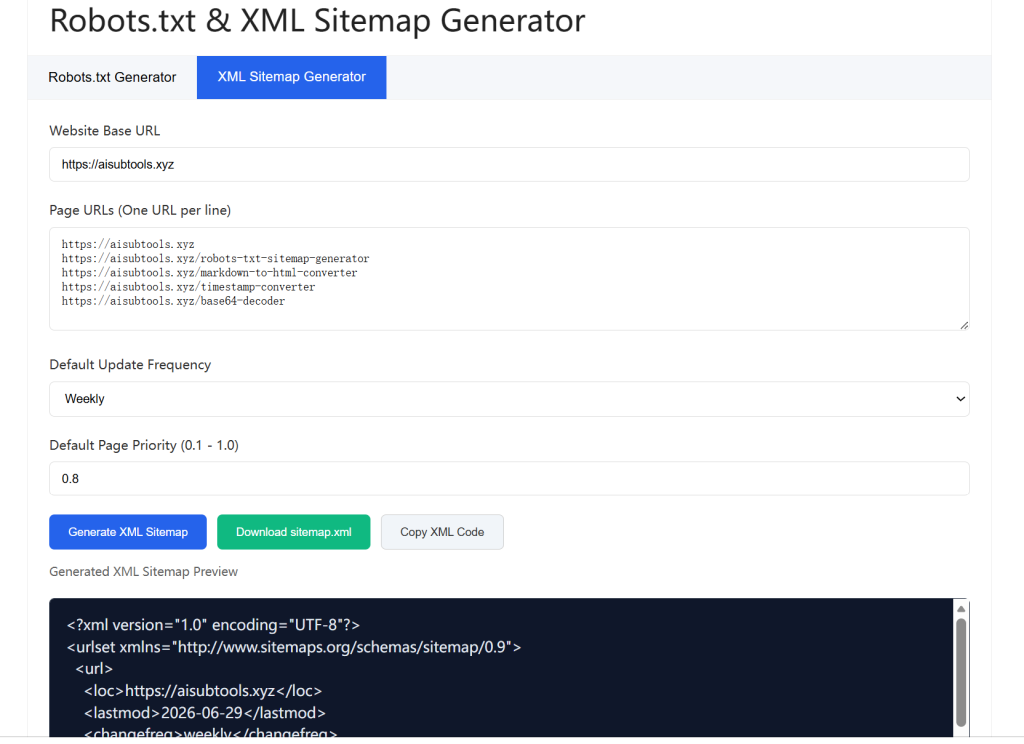
The standardized XML sitemap exported by our tool sorts all site pages in unified Google-compliant format, marking independent update frequency and priority parameters for each page.
This clear structural guide helps search spiders quickly sort out the entire site content system, greatly shortening the discovery and indexing cycle of new articles and tool pages. Long-term use of the Generator effectively solves the problem of unindexed new pages and fluctuating keyword rankings, maintaining stable long-term traffic growth.
4. Robots.txt & XML Sitemap Generator Ensures Full WordPress SEO Plugin Compatibility
Most third-party crawl file generation tools on the market have poor compatibility with WordPress mainstream SEO plugins. Generated robots.txt and sitemap files often conflict with Rank Math and Yoast operating logic, causing plugin parameter coverage, GSC submission failure, and frequent site SEO errors.
Our Robots.txt & XML Sitemap Generator is specially optimized for the WordPress ecological environment. All crawl files generated by the Generator fit perfectly with mainstream SEO plugin parameter settings, without rule conflicts or function coverage. It supports daily site optimization, regular sitemap updates and crawl rule adjustment, realizing one-time configuration and long-term stable SEO optimization.
5. Robots.txt & XML Sitemap Generator Offers Permanent Free Unlimited Use
Most professional SEO optimization tools and plugins charge annual fees and occupy a large amount of site server resources, increasing the operating cost of WordPress sites. Many low-cost tools also have strict usage limits, unable to meet the long-term update and optimization needs of webmasters.
Our Robots.txt & XML Sitemap Generator provides 100% free permanent services for all webmasters. There is no account registration, no email binding, no hidden fees, and no usage quantity limits. You can use the Generator to generate, copy, download and modify robots.txt and XML sitemap files unlimited times according to site content updates.
The tool runs completely online without occupying server resources, helping individual webmasters and small and medium-sized sites complete professional technical SEO optimization at zero cost.
Complete Step-by-Step Guide to Using Robots.txt & XML Sitemap Generator
Our Robots.txt & XML Sitemap Generator is designed for zero-threshold operation. Even webmasters with no technical foundation can independently complete file generation, server deployment and Google submission through the tool to optimize site crawl and indexing performance.
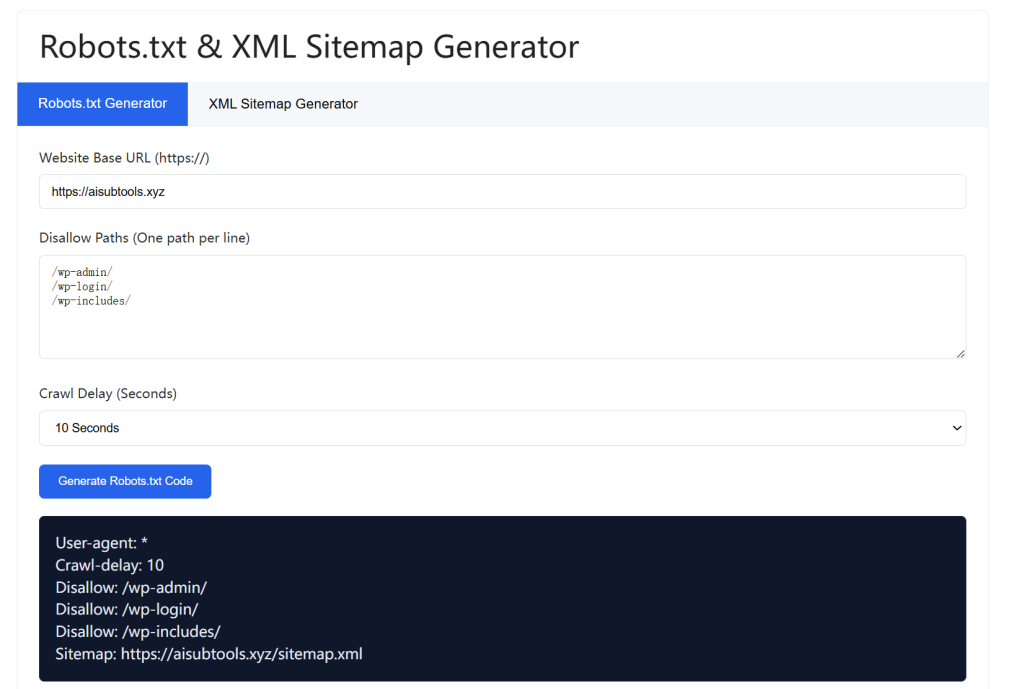
First, confirm your WordPress site’s official canonical domain name, including the complete HTTPS protocol and valid domain prefix, to avoid resolution errors. Enter the accurate domain name into the input box of the Robots.txt & XML Sitemap Generator to ensure the generated robots.txt and sitemap files match your site’s actual access rules.
Second, customize forbidden crawl paths according to your site’s actual situation. The Robots.txt & XML Sitemap Generator is built-in with universal invalid path shielding rules suitable for most WordPress sites. You can also manually add exclusive shielding paths such as internal test pages and temporary activity pages that do not need public indexing to further refine crawl rules.
Third, select a reasonable crawler delay parameter based on your server load. For new sites with weak server stability, appropriately reduce crawling frequency to avoid server pressure; for stable operating sites, you can increase crawling frequency to improve indexing efficiency. The Robots.txt & XML Sitemap Generator provides flexible parameter settings to adapt to all types of WordPress server environments.
Finally, click the generate button, and the system will instantly output standard robots.txt rule code and complete XML sitemap files. You can copy the code in one click or download the files locally through the Robots.txt & XML Sitemap Generator. Then upload the files to the root directory of your WordPress site via FTP or server background management tools to complete basic deployment.
After uploading the files generated by the tool, log in to Google Search Console to submit your sitemap link and robots.txt file address for official verification. Once verified, Google crawlers will follow the standardized rules to crawl your site efficiently. Cooperate with our Website External Chain Detection Tool to synchronously optimize off-site authority, your site search performance will get comprehensive steady improvement within one to two weeks, with significant improvements in site indexing speed, crawl budget utilization and keyword ranking stability.
Frequently Asked Questions (FAQ)
What exactly is a professional Robots.txt & XML Sitemap Generator?
A professional Robots.txt & XML Sitemap Generator is a dedicated front-end SEO tool, specially built to generate Google-standard crawler permission rule files and website page structure sitemaps for WordPress and various mainstream website programs. It replaces error-prone manual writing, outputs fully compliant structured code in one click, and protects the healthy operation of site search inclusion and keyword ranking.
How will standard Robots.txt & XML Sitemap improve my WordPress SEO rankings?
Standard Robots.txt screens invalid low-quality pages to save precious Google crawl budget, while standardized XML Sitemap lets search engines quickly locate and index all core content pages. The two files work together to reduce inclusion errors, speed up keyword ranking rise, and stabilize long-term organic search traffic acquisition of your WordPress website.
Can files generated by this Robots.txt & XML Sitemap Generator be used directly with Rank Math?
Completely yes. All crawl rules and sitemap structures output by our Robots.txt & XML Sitemap Generator are fully adapted to Rank Math all version parameter systems, support direct background submission, rule matching and regular update iteration, no secondary format modification is required at all.
Do I need to pay fees or register accounts to use this Robots.txt & XML Sitemap Generator?
This online Robots.txt & XML Sitemap Generator provides permanent free services for all webmasters. No account registration, no private information collection, no hidden annual fees, no generation quantity limits, you can use all tool functions freely for lifelong.
How often should I update Robots.txt & XML Sitemap files for my WordPress website?
It is recommended to use our Robots.txt & XML Sitemap Generator to regenerate and update files after major site structure changes, new page batch publishing, SEO plugin switching or permanent link rule adjustments, keep crawl rules and page maps fully consistent with real website operating conditions at all times.