Table of Contents
1. Common Daily Scenarios & Frustrating Pain Points of Manual Text Case Editing
1.1 Daily Work Scenarios That Require An Online String Case Converter
If you’re a front-end developer, content writer, WordPress blogger, or app coder, you have to adjust text letter casing hundreds of times every week, which is why a reliable Online String Case Converter becomes irreplaceable for your daily work.
Web developers face this issue all the time when naming variables, CSS classes, and file names. Programming rules strictly require specific formats: JavaScript needs camelCase variable names, backend config files demand snake_case, and constant values must be UPPER SNAKE CASE. When you copy raw text from documents or client briefs, the text always comes with messy random capitalization. A professional Online String Case Converter lets you reformat all text cases in one go, instead of editing every word manually.
Content creators and SEO writers also rely heavily on a solid Online String Case Converter. When writing page titles, H1 headings, and meta titles for your WordPress posts, Google search standards call for proper Title Case capitalization for better readability and click-through rates. When copying raw draft text from notes or chat records, sentences are often fully lowercase or randomly capitalized. Manually rewriting each capital letter wastes tons of valuable writing time, and our Online String Case Converter fixes this hassle instantly.
Freelance copywriters and social media marketers often need to generate bold UPPERCASE text for ad headlines, or clean lowercase text for body copy for Instagram and Facebook posts. Project managers also need consistent lowercase filenames for file sorting and cloud storage management. Without a dedicated Online String Case Converter, these small case edits pile up and heavily slow down your whole daily workflow.
1.2 Major Pain Points of Traditional Manual Case Editing Methods
Manual typing and editing is the most common old method, and it brings huge efficiency problems for every user. Changing the uppercase and lowercase of long paragraphs or dozens of code variable names one letter at a time is incredibly slow. It’s super easy to miss letters, leave inconsistent capitalization, or misspell words during manual editing. For coding work, one wrong letter case will trigger code errors and break your whole script entirely, which can cost you hours of debugging later on.
Desktop office software like Microsoft Word has basic case changing functions, yet it carries obvious limitations. You need to launch heavy Word software just for a simple case conversion task, which takes up system memory and startup time. These desktop tools only offer basic upper/lowercase options, with no support for developer-specific formats like camel case, pascal case, or kebab case — formats that every coder needs daily. Also, you cannot access desktop Word when working on a borrowed laptop, public office PC, or remote browser-only work device, making it completely inconvenient compared to our web-based Online String Case Converter.
Browser text manipulation extensions have their own clear downsides. Too many small utility extensions will bloat your browser, slow down page loading speed, and consume plenty of RAM. Many text tool extensions request unnecessary read/write permissions for your local files and browser data, creating hidden security risks for your work documents. Most free extensions only include 2 or 3 simple case modes, lacking advanced developer case formats, and never come with bulk text paste support, unlike our full-featured Online String Case Converter.
Random free online text tools found via Google search are usually unstable and annoying. Most third-party websites are covered with intrusive pop-up ads, malicious redirect links, and low-quality code that messes up your text spacing after conversion. Many tools enforce strict character limits for free use, or force account registration and email sign-ups before unlocking full features. Our ad-free Online String Case Converter removes all these unnecessary barriers, letting you finish unlimited text case conversion fully free at any time.
2. Standout Core Advantages of Our Online String Case Converter
2.1 8 Professional Case Modes With 1-Click Instant Conversion
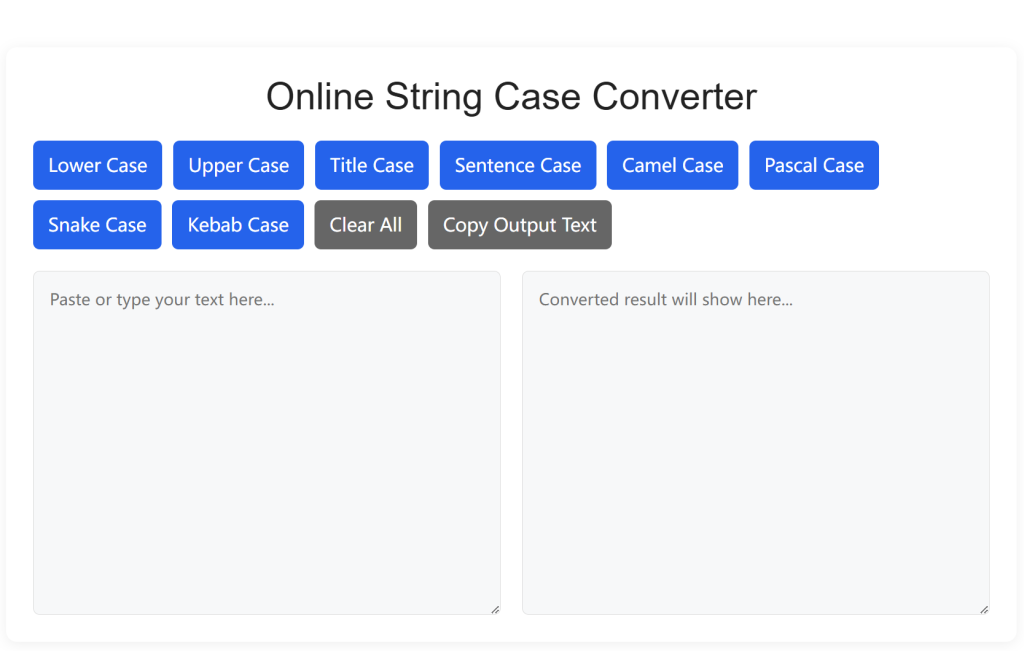
Our Online String Case Converter supports all commonly used industry formats in one single tool: Lower Case, Upper Case, Title Case, Sentence Case, Camel Case, Pascal Case, Snake Case, and Kebab Case.
The moment you paste your text into the input box, you can switch to any case format with a single click, with zero page reloads or server waiting time
. All conversion logic follows standard programming and writing naming conventions, guaranteeing perfectly standardized results every time.
Unlike basic simple tools online, our Online String Case Converter intelligently ignores extra blank lines and messy spaces automatically, keeping your text neat after reformatting.
2.2 Unlimited Bulk Text Input & One-Click Clipboard Copy
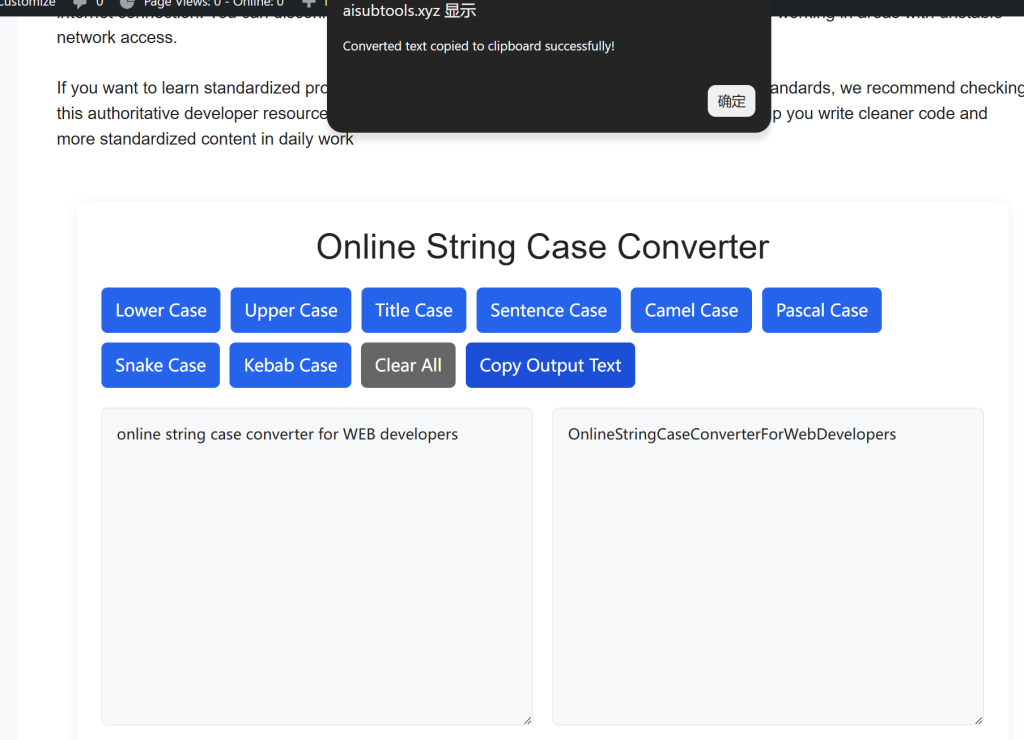
You can paste long paragraphs, multiple lines of code, or thousands of text characters into our Online String Case Converter with absolutely no character limits. After converting to your target case style, the built-in copy button lets you copy the finished text to your clipboard instantly, with no need to manually highlight and select text. This bulk processing feature is perfect for developers reworking batches of variable names, or writers reformatting full article drafts for WordPress publishing.
2.3 100% Forever Free, No Registration & No Captcha Checks
Our Online String Case Converter is permanently free for all developers, bloggers, students, and casual users worldwide. You never need to create an account, submit your email address, or complete annoying captcha verifications to use every single feature. There are no daily usage caps, no locked premium case modes, and zero hidden paywalls or upgrade prompts. Whether you only convert a short sentence each day, or process massive blocks of code text for a large website development project, every function of our Online String Case Converter stays completely free forever.
2.4 Clean Ad-Free Layout & Full Cross-Device Compatibility
We designed the interface of our Online String Case Converter purely for practical daily use, removing all pop-up ads, floating banner ads, and forced redirect links that trouble competing online text tools. The lightweight webpage loads in under one second on weak home and office internet connections. The tool works flawlessly on Windows PCs, MacBooks, Chromebooks, Android phones, and iOS iPads. You can adjust text case anywhere easily, whether you work in the office, travel remotely, or edit content on a tablet outdoors.
2.3 Handy Extra Bonus Practical Features
Beyond core case conversion, our Online String Case Converter adds user-friendly extra functions to optimize your workflow. A one-click Clear button wipes all input text instantly for new content entry. We also include a quick whitespace trim function to remove leading/trailing blank spaces automatically. For developers, the kebab case output is perfectly matched for HTML CSS class naming, and snake case works seamlessly for Python backend code, making our Online String Case Converter a dedicated all-in-one text utility for web tech workers.
3. Step-by-Step Guide to Use Our Online String Case Converter
Step 1: Paste or Type Your Target Text Into The Main Input Box
Navigate to the large main text input area at the top of our Online String Case Converter page. You can manually type your sentences, code strings, or paragraphs directly, or paste copied text from WordPress drafts, code editors, client documents, and chat conversations. You can input single lines or hundreds of lines of bulk text freely, with no character count restrictions whatsoever.
Step 2: Select Your Required Target Case Format
Browse the 8 case mode buttons above the output area, and click the format you need most. For article titles, pick Title Case; for JavaScript variables, choose Camel Case; for CSS class names, select Kebab Case; for backend constants, use Upper Snake Case. Our Online String Case Converter will process your text instantly and display the fully reformatted text in the right output box within milliseconds.
Step 3: Preview Results & Copy The Converted Text With One Click
Quickly check the output text to confirm the letter casing matches your exact requirements. Once verified, simply click the Copy Text button beside the output field. The fully formatted text will be saved directly to your device clipboard. You can immediately paste the text into your WordPress post editor, VS Code coding workspace, Notion documents, or social media content editors without any extra editing needed.
Step 4 (Optional): Clear Content & Start A New Conversion
If you need to process another batch of text, click the Clear Input button to empty the text box completely in one click. You can repeat the conversion process nonstop for endless rounds of text reformatting, perfectly suited for developers sorting dozens of code names or writers polishing multiple article headings in bulk.
Step 5 (Optional): Jump To Our Complementary Internal Text Tools
If you need further text optimization after case conversion, click the navigation link to our internal Text Deduplicator & Line Remover tool to clean duplicate lines and redundant blank spaces in your content. You can also access our Markdown to HTML Converter to turn finished formatted text into webpage-ready HTML code, building a complete text processing workflow on your website.
4. Who Can Benefit The Most From This Online String Case Converter
Professional front-end and backend developers will drastically boost coding efficiency with our Online String Case Converter. Fast conversion between camel case, snake case, and kebab case eliminates manual renaming of variables, classes, and file names, cutting down human errors during programming. WordPress theme developers regularly standardize function names and CSS identifiers, and this lightweight browser-based tool fits perfectly into their daily coding routine.
SEO content writers, WordPress bloggers, and copywriters gain huge convenience for on-page SEO optimization. Converting draft text to standard Title Case for H1/H2 headings and meta titles helps improve Google search readability, which lifts your organic ranking potential easily. Freelance content teams working across multiple client projects can quickly unify text capitalization styles to keep brand content consistent across all blog posts and landing pages.
UI/UX designers, social media marketers, and small business owners also get massive value from this tool. You can instantly generate uppercase bold headlines for social ads, neat lowercase body text for landing page copy, and standardized filenames for design asset storage. The cross-device access lets you edit text case on mobile phones while traveling, no desktop software required.
Beginner coding students and hobbyist writers can also use our Online String Case Converter as a learning aid. Comparing different case format results helps new learners understand standard programming naming rules and English writing capitalization rules, acting as both a practical working tool and a simple learning resource. Even administrative office staff can use it to standardize document filenames and spreadsheet content for neat file management.
5. Frequently Asked Questions About Our Online String Case Converter
Q1: Is there a character limit for text I can convert inside this tool?
Absolutely not. Our Online String Case Converter supports unlimited character input, whether you convert a single short word or full long articles and large blocks of code. There is no hidden cap on text length for free users.
Q2: Will my pasted text be stored or tracked on your server?
All text conversion calculations run locally within your web browser, instead of our backend server. None of your input text, code snippets, or private content is uploaded, saved, or tracked by our website, fully protecting the privacy of your sensitive work data.
Q3: Can I use this Online String Case Converter offline after loading the page?
Once the tool webpage finishes full loading in your browser, all core case conversion functions work perfectly without an active internet connection. You can disconnect Wi-Fi and keep converting text smoothly, ideal for users working in areas with unstable network access.
If you want to learn standardized programming naming rules and formal English capitalization standards, we recommend checking this authoritative developer resource:MDN Web Docs JavaScript Naming Conventions, It will help you write cleaner code and more standardized content in daily work