Table of Contents
Common Headaches Developers Face When Working With Base64 Image Codes
If you’ve ever worked on website development, email template coding, or backend API debugging, you have definitely run into messy Base64 image strings, and you must have wished for a reliable Online Base64 Image to Text Decoder Tool.
Let’s talk about the real daily pain points most web developers and designers deal with regularly when they lack a proper Base64 Image to Text Decoder Tool.
First off, raw Base64 image text is extremely long and unreadable. When you copy a Base64 code from WordPress database data, API response logs, or HTML source code, you cannot preview the image directly.
You have no idea what picture the string represents until you decode it fully, and your regular text Base64 tool will only spit out garbled text.
Manually embedding the full Base64 string into local HTML files just for a quick preview wastes tons of time, which is exactly why our dedicated Online Tool was built to solve this exact hassle.
Secondly, desktop offline decoders come with annoying limits. Many local software programs only process short Base64 strings, fail to handle high-resolution picture data, or force you to download extra applications just for a one-time decode task.
For freelance developers working on different Windows and Mac devices, installing dedicated software on every computer is totally inconvenient.
Our web-based Online Base64 Image to Text Decoder Tool removes all installation requirements entirely, working fully inside your browser anytime you need it.
Another big pain point is formatting errors after decoding. Some basic decoding tools mess up image dimensions, corrupt PNG transparency data, or output broken JPG files. When you need to restore embedded email signature images, WordPress inline media, or small icon assets from Base64 code, corrupted results will completely break your workflow. This tool preserves every original image detail perfectly during local browser decoding, eliminating file corruption entirely.
Last but not least, most free online decoders hide extra ads, lock bulk processing behind paywalls, or collect your uploaded Base64 data without clear privacy rules. It’s risky to paste sensitive project image Base64 strings on unknown third-party platforms.
Our Online Base64 Image to Text Decoder Tool runs fully client-side locally, meaning zero data upload to outside servers, keeping your private image content fully secure at all times.
Our professional tool is built specifically to solve all these frustrating problems for frontend developers, backend engineers, email marketers, and WordPress site owners, standing apart from generic text-only Base64 converters on the market.
Core Advantages Of Our Free Online Base64 Image to Text Decoder Tool
1. 100% Ad-Free & Unlimited Decoding For All Users With Our Online Tool
Unlike competing online decoding tools filled with pop-up ads and daily usage caps, our Online Base64 Image to Text Decoder Tool stays completely free with zero hidden restrictions.
You can decode short icon Base64 strings and large high-definition image Base64 codes endlessly, no registration, no login required, and no pro-version paywall for basic core features of this tool.
2. Real-Time Live Preview Right After Decoding In The Online Base64 Image to Text Decoder Tool
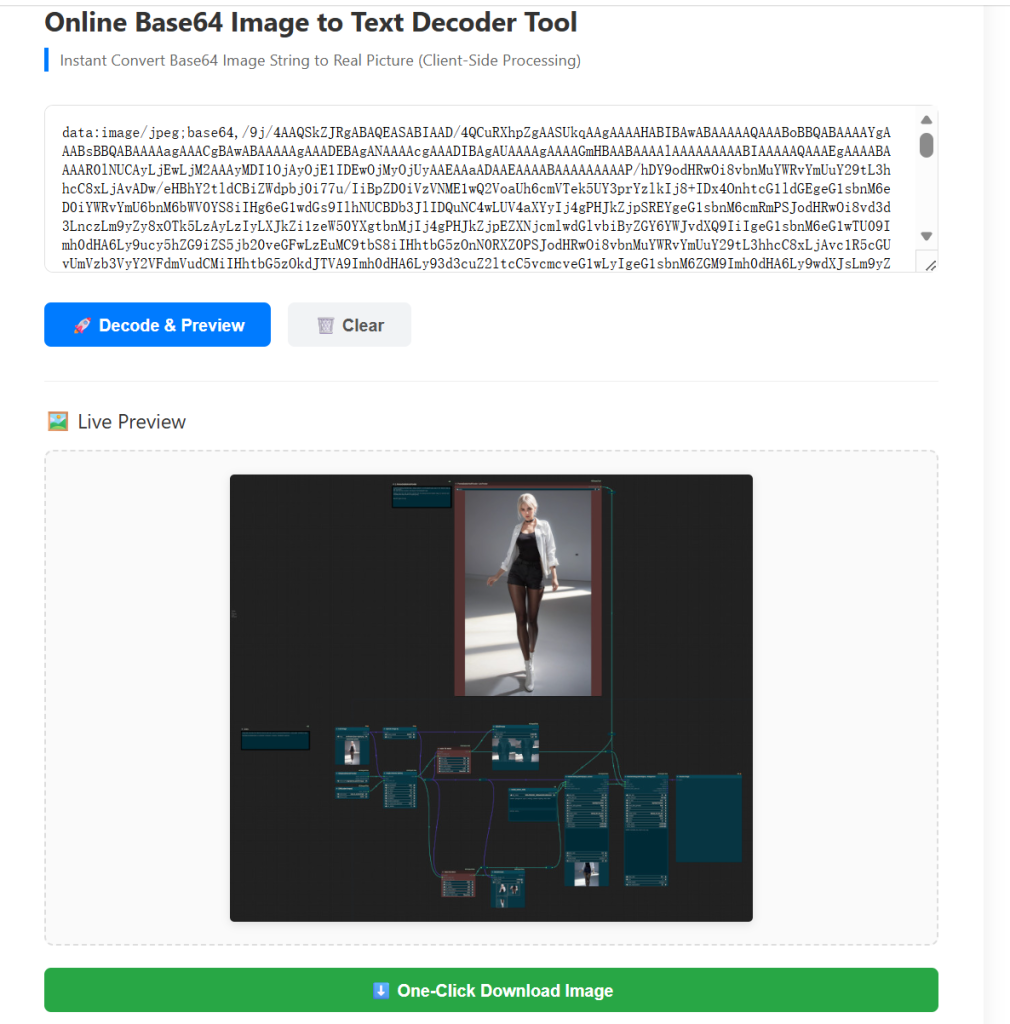
As soon as you paste your full Base64 image string into the input box and click the decode button on our tool, the tool instantly renders the original image in the preview area. You can check transparency for PNG files, verify picture quality, and confirm dimensions in one second, without saving the file to your local hard drive first.
This instant visual preview is the biggest upgrade our Online Base64 Image to Text Decoder Tool offers over plain text Base64 decoders.
3. One-Click Download For Decoded Images From The Base64 Image to Text Decoder Tool
Once the preview loads successfully inside the tool, you can download the restored picture directly in its original format, including PNG, JPG, and WebP. The tool preserves all original image attributes such as resolution, transparency channels, and color data perfectly, with zero quality loss during the decoding process.
4. Fully Secure Client-Side Local Processing On The Tool
All decoding calculations for our Online Base64 Image to Text Decoder Tool run entirely inside your web browser locally. Your Base64 string data never gets uploaded to our external server, which fully protects your private project images, company signature graphics, and confidential design assets.
We never store or share any of your input content on the tool, far safer than cloud-based decoding services.
H3: 5. Lightweight Browser Compatibility For The Online Base64 Image to Text Decoder Tool
This web-based tool works flawlessly on Chrome, Edge, Safari, and Firefox, supporting Windows, Mac, Linux, and mobile phone browsers. It loads fast even on slow network connections, and pairs perfectly with our existing developer tool suite on our website.
Step-by-Step Guide To Use Our Online Base64 Image to Text Decoder Tool
Using our Online Base64 Image to Text Decoder Tool could not be simpler, even for beginners with limited coding experience. Follow these 4 easy steps to finish your decoding task .
- Copy your complete Base64 image string
Locate your full Base64 code from HTML source code, API response content, WordPress database records, or email source files. Make sure you copy the entire string without missing characters or adding extra spaces. For reference, you can use our sister tool: Base64 Encoder Decoder Online Tool to generate matching Base64 image codes when needed, then test the results on our dedicated Online Base64 Image to Text Decoder Tool. - Paste the Base64 content into the input field of the Online Tool
Open our tool page, clear the default placeholder text, then paste your full Base64 string into the large text input box on the working panel of the tool. - Click the Decode & Preview button to run the calculation on the Online Base64 Image to Text Decoder Tool
Hit the dedicated blue decode button, and the browser will process the code instantly within our tool. If your string is valid Base64 image data, the preview window will display your original image immediately. If your code contains invalid characters, the tool will show a clear friendly error prompt to help you fix formatting issues quickly within the Online Base64 Image to Text Decoder Tool. - Preview and download your decoded image file via the Tool
Check the preview result to confirm the image is fully restored inside the Online Base64 Image to Text Decoder Tool. Click the Download Image button under the preview window to save the picture to your local device for coding, editing, or website deployment. When you finish your work, hit the Reset button on the tool to clear all content for your next task.
Who Can Get The Most Value From This Online Base64 Image to Text Decoder Tool?
Front-End Web Developers
When debugging inline Base64 images inside HTML, CSS, or JavaScript code, developers can quickly preview embedded icons and graphics using our the Base64 Image to Text Decoder Tool,, without embedding code into test HTML files. It speeds up frontend troubleshooting significantly during website building, making our Online Base64 Image to Text Decoder Tool an essential daily utility for frontend teams.
WordPress & Website Administrators
When repairing broken embedded media inside WordPress posts, restoring signature images for transactional emails, or checking Base64 picture data pulled from site databases, our Online Base64 Image to Text Decoder Tool becomes an essential daily helper. Pair it with our Free Website SEO Audit Tool to handle full site media and technical SEO optimization together alongside Base64 Image to Text Decoder Tool,
Email Template Designers
Modern HTML emails commonly embed small images as Base64 strings to avoid external image loading blocks from email clients. Designers can decode exported Base64 code and verify visual effects on our Online Base64 Image to Text Decoder Tool before launching formal email campaigns.
Backend API Engineers
When testing REST API responses that return image content in Base64 format, engineers can decode response data on the fly with our Base64 Image to Text Decoder Tool, to confirm if image transmission works correctly during backend development and testing workflows.
Frequently Asked Questions About Our Online Base64 Image to Text Decoder Tool
Will large Base64 image strings cause processing failure on the Tool?
Our Online Base64 Image to Text Decoder Tool supports long Base64 strings for regular web images including banners, icons, and product photos. For ultra-large raw image Base64 data, simply ensure your browser has enough free memory, and the local decoding process on the tool will run smoothly.
Can I decode Base64 text strings (not just images) on the Online Base64 Image to Text Decoder Tool?
This dedicated Base64 Image to Text Decoder Tool is optimized strictly for Base64 image decoding. For general text Base64 encode and decode tasks, please visit our universal Base64 Encoder Decoder tool on our site for full text processing features, separate from our image-focused Online Base64 Image to Text Decoder Tool.
Is my Base64 input data safe and private on the Online Base64 Image to Text Decoder Tool?
100% safe when using our online tool. All decoding logic runs locally on your device’s browser. No content is transmitted to remote servers, so your sensitive design and project data remains completely private at all times while using the tool.
Wrap Up
A reliable, fast Base64 Image to Text Decoder Tool is a small but irreplaceable utility for every web developer’s daily toolkit. Our dedicated Online Base64 Image to Text Decoder Tool delivers ad-free unlimited usage, local secure processing, instant live preview, and one-click downloading to fix all your Base64 image decoding pain points effortlessly.
Bookmark the tool page for quick access whenever you need to decode Base64 image strings fast. Feel free to explore our full collection of 25+ free developer online tools on our platform to cover all your daily coding, SEO, text conversion, and media processing needs alongside our trusted Online Base64 Image to Text Decoder Tool.
For advanced web development learning resources, you can check out practical guides on trusted developer platforms such as MDN Web Docs to learn more about Base64 image encoding standards for web development, to pair perfectly with your use of our Online Base64 Image to Text Decoder Tool.