Table of Contents
Online Image Compressor is one of the most essential web tools for bloggers, webmasters, eCommerce sellers, and content creators. Optimizing image file sizes directly improves website speed, Core Web Vitals scores, and overall SEO
Common Image File Problems Most Users Face
Large image files cause countless hidden troubles for daily online work. Many users do not realize that unoptimized images are the main reason for slow websites and failed uploads.
First, oversized images drastically slow down page loading speed. Even with caching plugins and clean site code, heavy images increase load time. Visitors leave quickly, which raises bounce rates and lowers Google search rankings.
Second, most platforms have strict file upload limits. Emails, website media libraries, and social media sites block large image uploads frequently.
Third, traditional image tools have major flaws. Standard image converters only change formats and cannot reduce size effectively. Desktop software requires installation, takes storage space, and often adds watermarks.
Many online compression tools store user images on remote servers. This creates privacy risks for personal photos, business product images, and design files.
Our Online Image Compressor solves all these common issues with simple, secure, and high-efficiency compression technology.
Why You Need a Dedicated Online Image Compressor
You may already use an image format converter on your site. Format conversion only changes file extensions like PNG, JPG, and WebP.
It does not compress file volume intelligently.
Our exclusive Free Online Image Converter handles format transformation.
This new Online Image Compressor focuses purely on lossless file size reduction. The two tools are completely complementary and zero repetition.
Core Advantages of Our Online Image Compressor
1. True Lossless Compression with Adjustable Quality
This Online Image Compressor uses advanced smart compression algorithms.
Users can freely adjust compression intensity from low compression to ultra compression.
Visually, the compressed images remain almost identical to the original. Meanwhile, file size can drop by up to 85%.
2. 100% Local Browser Processing (Zero Data Leak)
All image compression processes run inside your local browser.
No files upload to external servers. No image data is stored or tracked.
Private photos, commercial product images, and design drafts stay fully secure.
3. Unlimited Bulk Image Compression
Users can batch upload dozens of images at one time.
The tool processes all images simultaneously.
One-click ZIP bulk download saves massive working time for content creators and store owners.
4. No Watermarks, No Registration, No Fees
This Online Image Compressor is permanently free for all users.
There are no daily limits, no premium subscriptions, and no hidden charges.
Every exported image is clean without any brand watermarks.
5. Fully Responsive for All Devices
The compression tool works perfectly on PC, tablet, and mobile browsers.
You can optimize website images on desktop or compress mobile photos
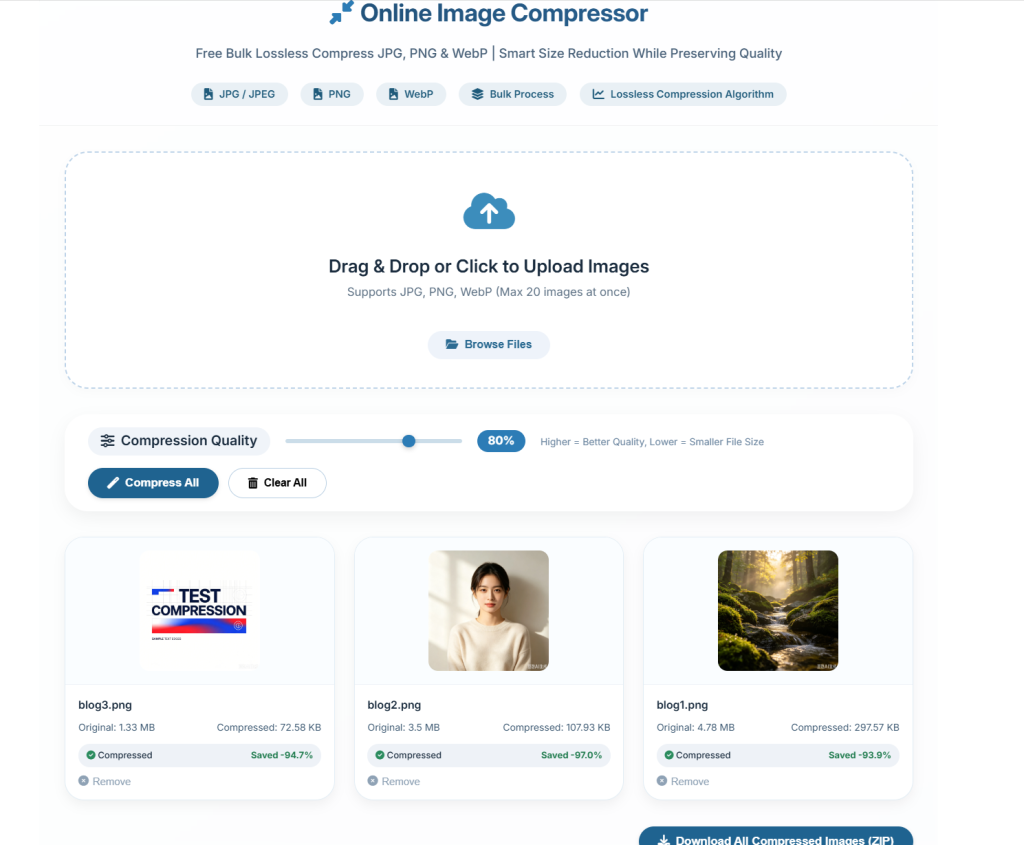
[INSERT BEFORE & AFTER IMAGE FILE SIZE COMPARISON SCREENSHOT HERE]
How to Use This Online Image Compressor (3 Simple Steps)
Step 1: Upload Your Images
Click the upload button or drag and drop JPG, PNG, or WebP images into the tool area.
Preview all uploaded thumbnails to confirm correct files.
Step 2: Adjust Compression Level
Use the slider to set your preferred compression ratio.
For website SEO speed optimization, use 70%–85% compression.
For high-definition product displays, keep compression below 50%.
Step 3: Preview and Download
Check real-time compressed file sizes for each image.
Download single images individually or download all files in one ZIP package.
[INSERT 3-STEP OPERATION GUIDE SCREENSHOT HERE]
Main Usage Scenarios
Website SEO & Speed Optimization
Large images badly affect Core Web Vitals indicators.
Use this Online Image Compressor to optimize featured images, banners, and article images.
Faster loading speed improves ranking performance and user retention.
You can combine this tool with our XML Formatter & Validatorto build a complete SEO optimization workflow.
eCommerce Product Image Optimization
Online store owners can batch compress product galleries.
Smaller image sizes speed up store page loading and improve customer browsing experience.
Social Media & Email Sharing
Compressed images avoid platform upload limits.
You can send high-quality pictures via email or post clean visuals on social platforms.
Local Storage Saving
Compress design files and photo collections to save hard drive space without quality loss.
Reliable Tool Support
This Online Image Compressor runs on stable global browser-based technology.
If you encounter usage problems, you can submit feedback throughContact Us page.
To learn official image optimization standards, check Google’s Core Web Vitals https://web.dev/vitals/
A qualified Online Image Compressor is essential for every modern content website. Start compressing your images today to boost speed, security, and SEO performance completely for free.
Online Image Compressor
Free Bulk Lossless Compress JPG, PNG & WebP | Smart Size Reduction While Preserving Quality
Drag & Drop or Click to Upload Images
Supports JPG, PNG, WebP (Max 20 images at once)
No images uploaded yet, please upload JPG, PNG or WebP files
General Basic Questions
What formats can I compress?
JPG, PNG, WebP. Mixed bulk uploads are supported.
Is this tool free? Any watermark or registration required?
Completely free. No fees, no watermarks, no sign-up neede.
Are there limits on bulk compression?
Unlimited batches, no cap on how many images you process at once.
Can I adjust compression quality and preview results?
Yes. A quality slider is available, and you can preview images before downloading. It supports true lossless compression.
Are my uploaded images secure?
ll compression runs locally in your browser. Files never upload to our servers; we don’t store any of your photos.
What devices can I use this tool on?
Fully responsive, works on desktop, iPhone, Android and tablets via any modern browser.
How to compress images in 3 steps?
Upload images 2. Adjust compression strength 3. Preview & download
Who is this tool for?
Website owners for SEO speed optimization, e-commerce sellers, social media creators, and anyone needing smaller image files without quality loss.