Table of Contents
Common Pain Points Users Face When Needing an IP Address Location Lookup Tool
Running a website or managing online servers always brings hidden troubles related to IP tracking, and most web admins have run into frustrating issues with basic IP checking tools before. Let’s break down the most frequent real-world problems you might encounter right now.
First, many free online IP geolocation tools return vague location data that only shows a broad city area, with no detailed region, zip code, or timezone data. When you need to block suspicious visitor IPs from specific areas or confirm your proxy server’s actual physical location, vague results make your work completely useless.
Second, most basic lookup platforms only support IPv4 addresses, ignoring modern IPv6 addresses that are widely used by cloud servers and residential home networks today. If your server runs on IPv6 infrastructure, old tools will simply throw an error and refuse to parse your IP data at all.
Third, tons of competing IP lookup tools force you to complete annoying captchas, watch pop-up ads, or sign up for a paid membership just to view full ISP details. Small bloggers and hobby web developers hate wasting precious time on unnecessary steps just for a one-time quick IP check.
Fourth, many location checkers cannot display ISP carrier information accurately. You cannot confirm whether an IP belongs to a residential home network, a cloud data center, a mobile cellular network, or a VPN proxy node. This makes it hard to tell legitimate human traffic apart from bot spam traffic hitting your WordPress site every day.
Last but not least, a large number of third-party IP tools will log every IP address you input into their backend databases. If you check sensitive server IPs regularly, you risk exposing your server information to unknown third-party platforms without any privacy protection.
Why Our Free IP Address Location Lookup Tool Stands Out From Competitors
Our IP Address Location Lookup Tool is built exclusively for webmasters, SEO specialists, server managers, and regular internet users, solving every pain point mentioned above with targeted, practical advantages.
Advantage 1: Full IPv4 & IPv6 Compatibility With Real-Time Geolocation Data
Unlike outdated lookup tools locked to IPv4 only, our system fully supports both IPv4 and standard IPv6 address parsing. We pull updated geolocation databases in real time to deliver precise results including country, state/province, city, postal zip code, local timezone, and regional coordinate data. You get pinpoint location results instead of generic wide-area region labels every single time.
Advantage 2: Complete ISP & Network Background Details At Zero Cost
Once you input your target IP address, our tool instantly displays full ISP provider name, network ASN number, connection type (residential, data center, mobile, VPN), and network range information. All ISP lookup features are 100% free forever, with no hidden paywalls, no mandatory account registration, and no pay-to-unlock premium data tiers.
Advantage 3: Ad-Free Operation & Strict User Privacy Protection
Our IP Address Location Lookup Tool runs with zero pop-up ads, no forced captcha verification for regular usage, and no persistent logging of your submitted IP addresses. Your lookup records are never stored on our long-term server database after your session ends, which keeps your server and personal IP information fully secure against data leakage risks.
Advantage 4: Ultra-Fast Loading Speed & Cross-Device Responsive Design
The tool frontend is lightweight and optimized for fast response times. Results load within 1 second after you submit your IP address, whether you access the page from a desktop PC, laptop, smartphone, or tablet. The responsive layout perfectly adapts to all screen sizes, so you can run an IP geolocation check on the go whenever you need to with our convenient IP Address Location Lookup Tool.
MaxMind IP geolocation official documentation
Step-by-Step Guide to Use Our IP Address Location Lookup Tool
Using our IP Address Location Lookup Tool takes only three simple steps, even for beginners with zero technical experience. Follow this easy tutorial to get your IP geolocation and ISP data instantly.
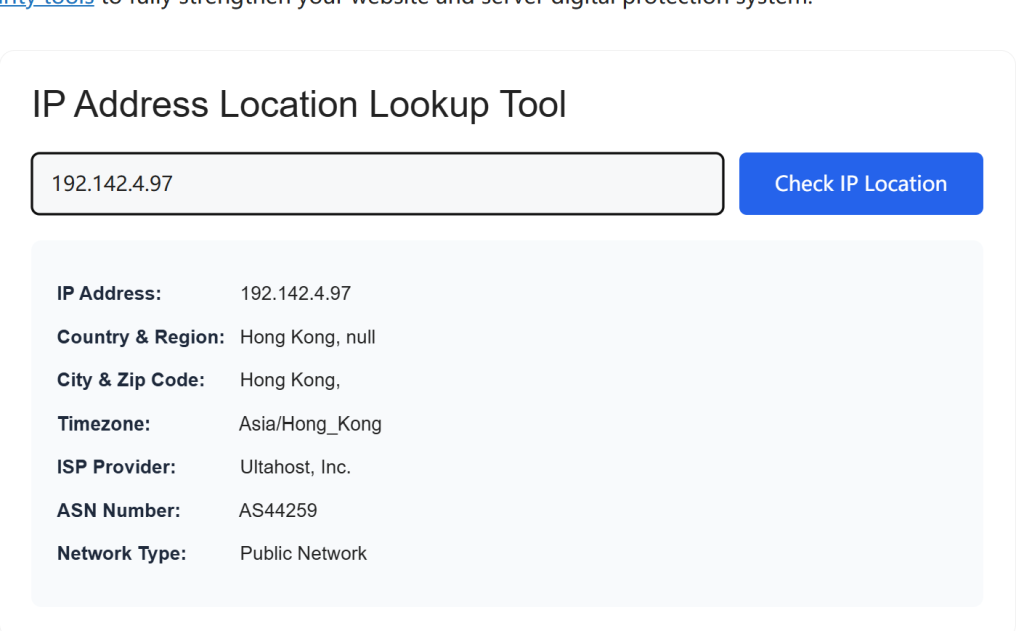
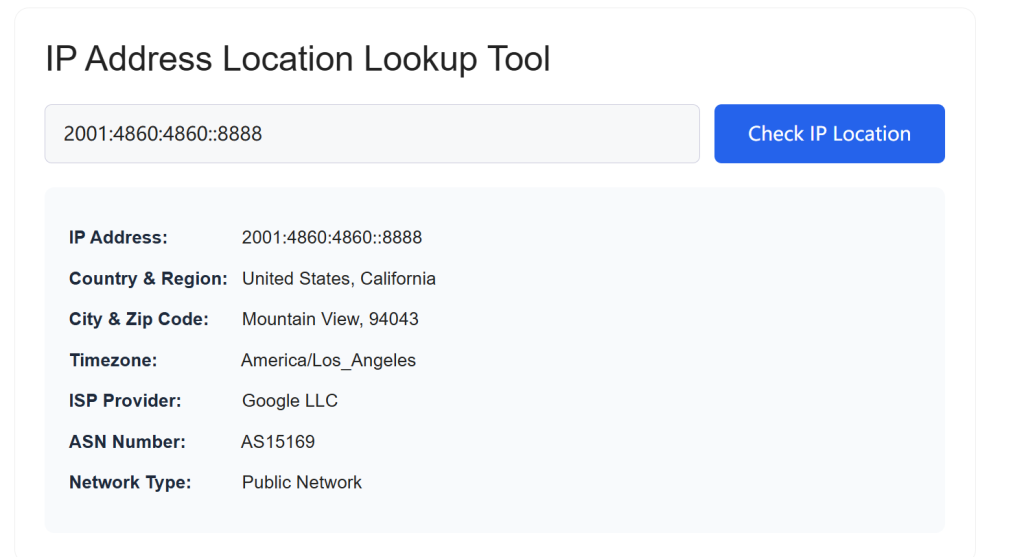
Step 1: Navigate to the Main Tool Input Box
Locate the central input field on this page dedicated for IP entry. You can manually type any public IPv4 or IPv6 address into the text box directly. For convenience, you may also copy your target IP address from your server backend, website access log, or network settings panel, then paste it into the input area with a simple keyboard shortcut.
Step 2: Initiate the Real-Time Lookup Process
After confirming your IP address is entered correctly, click the blue “Check IP Location” button right below the input box. Our backend system will immediately connect to our updated geolocation database to process your request. There is no waiting period or extra verification step required for standard IP checks.
Step 3: View & Export Your Full IP Lookup Results
All parsed data will show up in a clear result table on the page within moments. You can view location coordinates, timezone, ISP name, ASN, connection type, and regional details in an organized layout. If you need to save the data for later reference, simply copy the result text to your clipboard, or manually record the key details for your server audit or traffic analysis work completed via our IP Address Location Lookup Tool.
website traffic analysis tools
IANA official IP address standard page
Common Usage Scenarios for the IP Address Location Lookup Tool
This IP geolocation checker fits perfectly into dozens of daily online work scenarios for different user groups.
For WordPress site owners and SEO practitioners, you can analyze visitor IP locations to understand your core audience geographic distribution, adjust regional SEO strategies, and block malicious bot IP addresses from high-risk regions efficiently. Pair this tool with our existing online SEO toolkit to complete a full website security and ranking audit easily.
For cloud server administrators and VPS users, you can verify the actual physical location of your rented cloud server IP to confirm it matches the advertised node region from your hosting provider. You can also trace abnormal login IPs to spot unauthorized access attempts on your server.
For general home internet users, you can quickly check your current public IP address and its corresponding ISP provider to troubleshoot home network connection issues, or verify if your VPN service is functioning correctly with the expected overseas IP location.
Frequently Asked Questions About Our IP Lookup Tool
Is this IP Address Location Lookup Tool completely free for unlimited use?
Yes. Core IP geolocation and ISP lookup features are free to use with no daily usage limits for regular users. We only restrict abnormal high-frequency automated bot requests to keep server performance stable for all visitors.
Can I use this tool to find the exact physical home address of an IP user?
No. Our geolocation data only provides public network-level regional location information, which cannot pinpoint a specific residential street address for privacy compliance reasons. This aligns with global internet data protection regulations strictly.
Why does the IP location result show a nearby city instead of my exact city sometimes?
IP address allocation is managed by regional ISP carriers. Some IP segments are registered to a central regional hub city rather than smaller local cities. Our database uses the most accurate public IP allocation records available to deliver the closest possible location result.
When you finish checking IP geolocation details for server safety and network risk prevention, you can also explore our complete set of online network security tools to fully strengthen your website and server digital protection system.
IP Address Location Lookup Tool
Core Frequently Asked Questions
Is this IP Address Location Lookup Tool totally free with unlimited searches?
Yes, 100% free with no usage limits, hidden charges or mandatory sign-up. All IPv4/IPv6 geolocation, ISP & ASN data can be checked unlimited times at zero cost.
What makes our IP Address Location Lookup Tool better than competitors?
4 core advantages: Dual IPv4/IPv6 real-time data, full ISP&ASN data for free, ad-free interface with zero-log privacy, ultra-fast responsive loading across all devices.
Do I need to create an account to use the IP lookup tool?
No registration or login required. Paste any valid IP and run real-time lookup instantly to protect your privacy.
Can I get the exact residential physical address via this IP Address Location Lookup Tool?
No. It only returns public network-level data (city, ISP, ASN, timezone). Private home addresses, personal identity info will never be displayed, fully compliant with global privacy laws.
Why does the IP location show a nearby city instead of my exact location?
IP databases map IP ranges to ISP regional server hubs rather than individual devices. VPN, proxy and cellular IPs are more likely to show offset nearby cities.
Does the tool support both IPv4 and IPv6 lookup?
Absolutely. It auto-detects IP version and provides synchronized real-time geolocation data for IPv4 and IPv6 addresses.
What data will the IP Address Location Lookup Tool generate after search?
Full report includes country/region/city, ISP name, ASN number, timezone, network type and proxy/VPN risk tag, all updated in real time.
Can I export and save my IP lookup results?
Yes. An export button will pop up after lookup, allowing you to download full IP geolocation details as text files for offline storage.
Is there pop-up or banner ads on this IP lookup tool page?
Our tool is completely ad-free. No disruptive ads to interrupt your IP geolocation checking process.
Does this IP Address Location Lookup Tool work on mobile and desktop?
It adopts fully responsive cross-device design, compatible with phones, tablets, laptops and Macs without function loss.
Will the tool record and store all IP addresses I searched?
We apply strict zero-log privacy policy. No input IPs, search records or user fingerprints will be stored on our server, and we never share data with third parties.
Will the target IP owner be notified when I run a lookup?
No. We only fetch passive public database records without sending any ping or alert to the target IP, your lookup behavior stays untraced.
What common scenarios can I use this IP Address Location Lookup Tool for?
Website traffic analysis, online payment fraud prevention, network troubleshooting, VPN location verification and regional content planning.
What causes slow loading during IP lookup?
Malformed invalid IP input, temporary database sync delay or local network latency. Recheck your IP format or refresh the page to fix it.
Can I use this free IP lookup tool for commercial business?
Free manual lookup is allowed for commercial use like fraud screening and internal network management. Automated bulk API access is unavailable for free version.