Table of Contents
JSON CSV Converter is a lightweight, browser-based online tool designed specifically for developers, data analysts, and office workers. This utility allows users to convert JSON to CSV and convert CSV to JSON in one single page. All conversions run locally inside your browser, without uploading files, without registration, and without watermarks. It is a practical and essential tool for daily data formatting and data migration tasks.
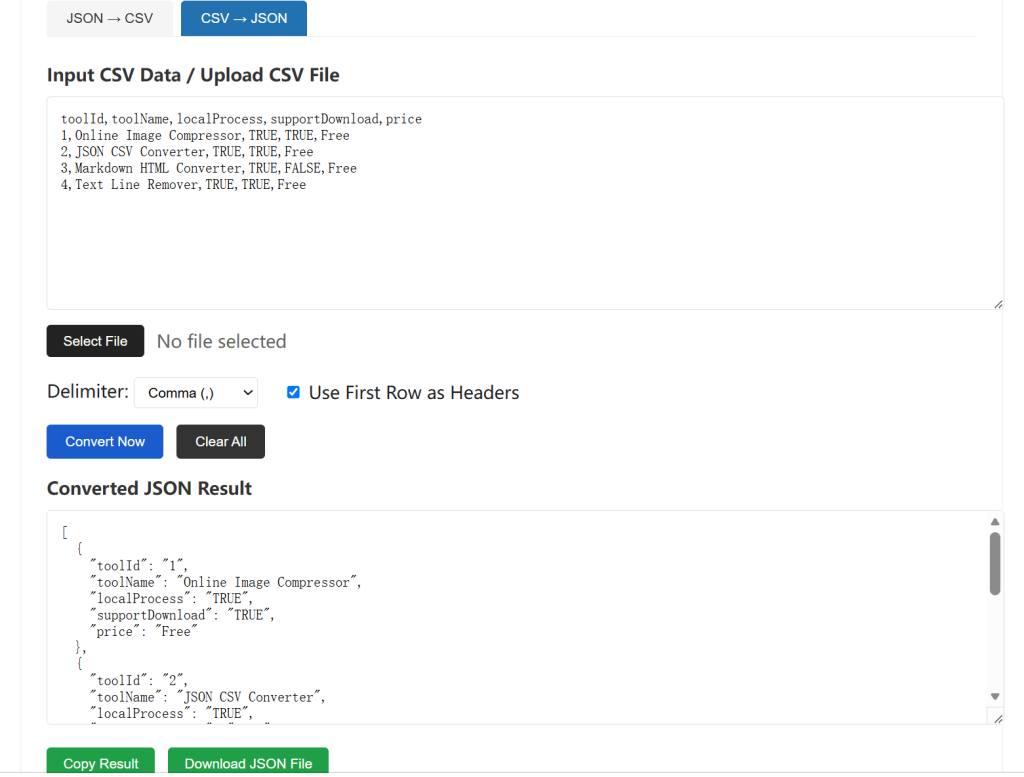
Common Problems When Converting JSON and CSV Files
Many users face consistent formatting troubles when working with structured data. Developers often receive JSON responses from APIs but cannot directly import the data into Excel or spreadsheet software for viewing and analysis. Manually sorting fields will cause messy layouts, missing columns, and incorrect data alignment.
For office workers and data operators, CSV files exported from spreadsheets cannot be directly used for front-end configuration, database testing, or API debugging. Most online converters on the internet have obvious drawbacks such as distorted encoding, broken line breaks, missing headers, and limited free conversion times.
Third-party desktop conversion software requires installation, occupies disk space, and cannot quickly process temporary data. Many platforms force users to log in or pay premium fees for batch conversion functions. These inefficient workflows greatly slow down daily development and office productivity.
Advantages of Our Online JSON CSV Converter Tool
Our JSON CSV Converter focuses purely on core conversion functions without redundant features. It supports two-way conversion between JSON and CSV formats, fully meeting development and data processing needs.
JSON CSV Converter is also ideal for batch data migration between databases and spreadsheets.
All data processing is completed locally on the user’s device. No data is transmitted to external servers, which ensures data security and privacy protection. The tool supports multiple delimiter options, including comma, semicolon, and tab. Users can freely enable or disable table headers according to different usage scenarios.
This JSON CSV Converter intelligently recognizes special characters, line breaks, and quotation marks inside data content. It effectively avoids garbled text, parsing errors, and format disorder that commonly appear in ordinary conversion tools. The tool loads quickly, supports pasted text input and file upload input, and provides one-click copying and file downloading.
How to Use This JSON & CSV Two-Way Converter
Using this online JSON CSV Converter tool is simple and friendly for beginners and professionals.
First, select your conversion mode. You can switch between JSON to CSV mode or CSV to JSON mode according to your data format.
Second, input your data. Paste your structured text content directly into the input box, or upload local JSON and CSV files for automatic parsing.
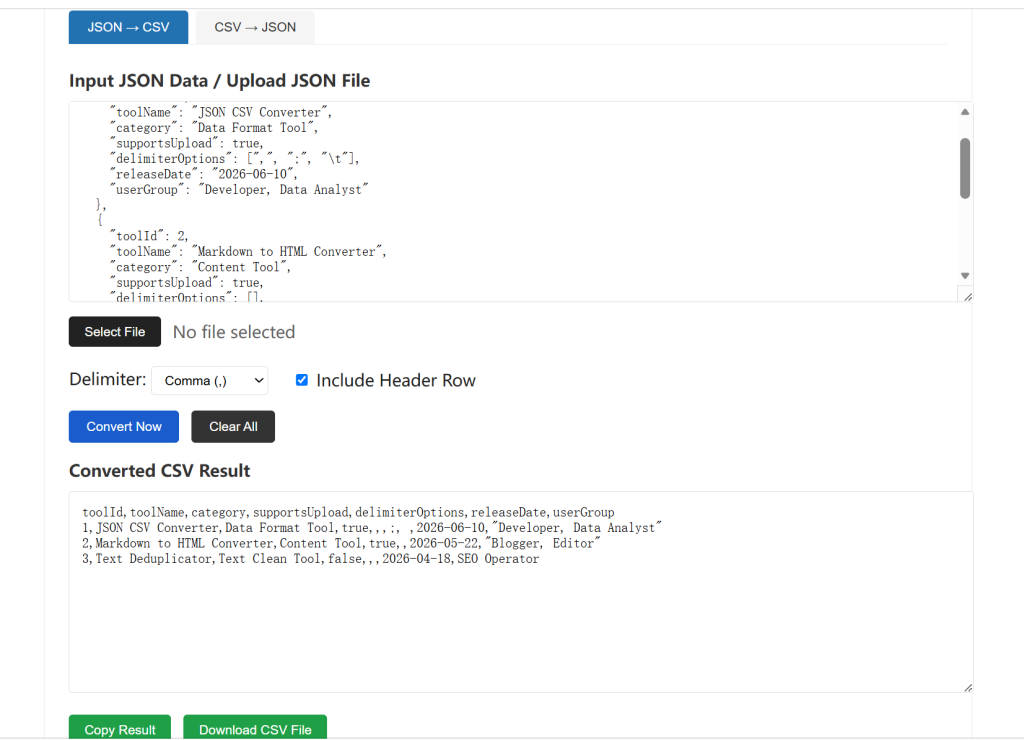
Third, adjust custom settings. Choose your required delimiter format and decide whether to include header rows in the output result.
Fourth, click the convert button. The system will instantly generate standard formatted results with accurate structure and clean layout.
Finally, copy the output content to your clipboard or download the converted file for local storage and subsequent use in development, reporting, and data analysis.
Common Application Scenarios
This free online JSON CSV Converter is widely used in front-end development debugging, back-end API data sorting, database data migration, Excel report conversion, business data statistics, and daily office data arrangement. It provides fast and accurate format conversion for all structured data processing work.
This JSON CSV Converter ensures accurate parsing of special characters and line breaks, which many other tools fail to handle.
If you need to organize and repair messy code structures, you can use our free online JSON formatter tool to standardize your JSON data format or official CSV format specifications, refer to the RFC 4180 standard published by IETF.
Tool Embedding Code (Ready to Use)
Frequently Asked Questions About JSON CSV Converter
Will my uploaded JSON and CSV data be saved to your server when using the JSON CSV Converter?
No, all conversion processes of the Converter run locally within your browser. Your raw JSON strings and CSV spreadsheet data never get uploaded to external servers. There is no storage, logging or backup of your sensitive business data, which fully protects private datasets, user information and internal statistical files.
Is this JSON CSV Converter totally free for unlimited conversions?
Our JSON CSV tool is 100% free for permanent use. There are no daily conversion limits, file size restrictions, watermarks or hidden paid upgrades. You can switch between JSON to CSV and CSV to JSON conversions as many times as you need without extra charges.
Do I need to register an account or log in to operate the JSON CSV Converter?
Registration, email verification and login are not required at all. Simply open the converter page, paste text or upload local files, then complete two-way data conversion immediately without submitting any personal information.
What conversion modes does the JSON CSV Converter support?
This all-in-one JSON CSV Converter provides two core bidirectional functions:
1. JSON to CSV: Parse nested JSON objects / JSON arrays and export standardized spreadsheet CSV format
2. CSV to JSON: Convert table CSV data into structured JSON objects for backend, API and development use
It also supports direct text input and local file upload for both formats.
What file sizes and data structures can the JSON CSV Converter handle?
The Converter supports standard flat JSON arrays, simple nested JSON data, comma-separated CSV files, and multi-row spreadsheets. The single upload limit reaches 10MB, covering most daily data analysis, backend debugging and office statistics demands.
Can I download the converted file directly from the JSON CSV Converter?
Yes. After finishing conversion on the JSON CSV Converter, you can either copy the generated text with one click or hit the download button to export a standalone .json or .csv file to your local device for Excel, database or project use.
Does the JSON CSV Converter work on mobile phones, tablets and all mainstream browsers?
It adopts fully responsive design. It works smoothly on Windows, Mac, Android and iOS devices, compatible with Chrome, Firefox, Edge, Safari and all modern browsers. You can convert data on laptops, office desktops or mobile devices anytime.
What common crowds is the JSON CSV Converter suitable for?
The converter is built for three main groups: frontend & backend developers processing API JSON responses, data analysts sorting statistical spreadsheets, and office staff converting table data between development and office software without complicated desktop software.
Can I embed the JSON CSV Converter on my own website?
We provide ready-to-use embedding code for the thie converter. You can copy the official embed snippet and add this two-way data conversion tool to your blog, developer document site or internal platform for your visitors or team members to use freely.
Where can I learn standard JSON and CSV format specifications when using the JSON CSV Converter?
To avoid parsing errors and master standard data formatting rules, you can refer to the MDN official JSON documentation while operating the tool to improve your data processing efficiency.