Table of Contents
Common User Challenges & Real-World Scenarios
Most beginners, freelance creators, and personal brand owners run into the same roadblocks when trying to build a personal site or online portfolio. Without technical experience, putting together a clean, functional website can feel overwhelming and time-consuming.
1.1 No coding skills to build a website
Most people don’t know how to write or edit HTML, CSS, or JavaScript code. Designing layouts, adjusting styles, and getting a site ready for deployment all require basic technical knowledge. Many users end up paying expensive fees to hire developers, just for a simple personal showcase site.
1.2 Low-quality, outdated free templates online
Most free website templates available online look outdated and unpolished. A lot of them suffer from messy code, broken layouts, and poor mobile support. Many also come with hidden bugs, slow loading speeds, and generic designs that make your site look unprofessional.
1.3 Complicated manual editing workflow
Traditional templates only offer raw source code downloads. To make any changes, you have to download files, open desktop editors, and modify code line by line. Even small tweaks like changing text or images require technical work, which is not friendly for non-developers.
1.4 Slow and inefficient site creation process
Building a website from scratch takes hours or even days — from picking a layout and adjusting styles to fixing responsive issues. If you just need a fast, clean online portfolio or personal homepage, the entire traditional workflow is far too tedious.
Learn the basics of HTML templates with the official MDN HTML Beginner Tutorial
If you work with website content, our Markdown to HTML Converter can help you format your code easily.
2. What Is This HTML Website Template Generator?
This HTML Website Template Generator is a user-friendly online tool built for anyone who wants to launch a professional website without coding or complicated setup. It comes with a curated collection of modern, fully responsive website templates and lets you edit everything directly in your browser.
You can choose simple visual editing for fast setup, or switch to raw code mode for full customization. Whether you need a personal homepage, creative portfolio, resume page, or simple landing page,.
This HTML Website Template Generator helps you build and export a complete working website in minutes.
2.1 Key Benefits of the HTML Website Template Generator
- No-code visual editing: Simply click and modify content, drag elements, adjust colors, and replace images. All changes show up instantly with real-time previews.
- Modern template collection: Browse clean, trendy templates for portfolios, personal resumes, blogs, and small business landing pages. All designs follow current UI trends and work for professional use.
- Dual editing modes: Switch effortlessly between beginner-friendly visual editing and developer-focused code editing. Tweak full HTML, CSS, and JavaScript code for advanced customization.
- 100% responsive layouts: Every template automatically adjusts to desktops, tablets, and mobile phones. No broken layouts, no messy scaling — perfect user experience across all devices.
- One-click source export: Once you finish editing, download the full website source code in a single compressed file. All files are well-organized and ready for hosting deployment.
- Clean & lightweight code: No bloated scripts, no useless code, and no hidden ads. The optimized code ensures fast page loading and meets Google and Rank Math SEO requirements.
To learn more about how to optimize your website for search engines, you can check out the official Rank Math SEO Guide.
For working with website links and parameters, our URL Encoder & Decoder can make the process easier.
2.2 Who HTML Website Template Generator Is For
- Total beginners who want a professional personal website with zero coding experience
- Freelancers and creators needing a polished online portfolio to showcase work to clients
- Bloggers and content creators building a simple personal brand homepage
- Front-end learners practicing webpage layout and basic code editing
- Small business owners looking for a fast, affordable showcase landing page
3. How to Use the HTML Website Template Generator (Step-by-Step)
This tool requires no downloads, no software installation, and no paid membership. You can start designing and publishing your website right away in three simple steps.
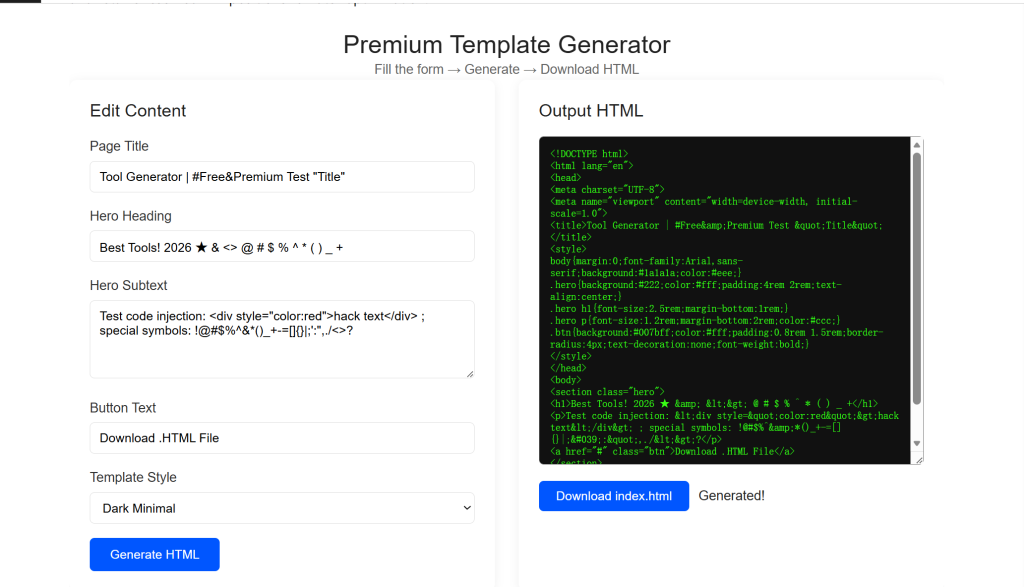
3.1 Pick a template that fits your needs
Browse the template library and filter styles based on your project type — portfolio, personal homepage, resume, or landing page. Preview both desktop and mobile versions, then select your favorite template to start editing.
This screenshot shows the HTML Template Generator interface. You can customize your landing page content (title, heading, subtext, and button text), choose a template style, and generate the corresponding HTML code in real time. Click “Generate HTML” to preview your code, then use “Download index.html” to save the file.
3.2 Customize with visual or code editing
If you’re new to web design, use the visual editor to rewrite text, swap images, change colors, and rearrange the whole layout easily. If you’re familiar with web development, switch to the code panel to edit the full source code, adjust styles, or add custom interactive features.
The Visual HTML Editor lets you build pages with drag-and-drop components (headings, paragraphs, images, and buttons). Double-click any text to edit it directly, upload your own images, and preview changes live in the code panel. All edits are synced to the source code for export.
3.3 Export code and publish your site
After you finish designing and previewing your page, save all your changes. Export the complete source code package, then upload the files to your web hosting or server to make your website live online.
To learn more about hosting and deploying your static site, you can refer to the official MDN Website Hosting Guide.
Before uploading your files, you can use our JSON Formatter & Validator to make sure your configuration files are error-free.
4. Functional Page HTML Code (SEO Optimized)
Below is the full responsive front-end code for the tool’s core function section. The code is clean, mobile-friendly, Rank Math SEO-ready, and retains reserved link positions for later optimization.