Table of Contents
Common Troubles Users Run Into During Character Coding Processing
Lots of developers, webmasters and content editors run into messy text errors when missing an available unicode coding solution. Many beginners spend hours searching valid coding converter sites, yet most third-party platforms limit free Unicode Conversion times or load annoying pop-up ads.
When configuring JSON scripts, mini-program parameters or website source codes, ordinary Chinese, emoji symbols turn into garbled boxes only because users lack instant Unicode Conversion support. Copying captions with special emojis fails to display normally on HTML pages, and manual checking coding tables for this online utility wastes dozens of minutes for short paragraphs.
If you need complementary coding processing besides Unicode Conversion, jump to our in-site tool: Base64 encode decode tool . Base64 coding always matches Unicode Conversion in backend parameter arrangement.
Core Intro Of Our All-in-one Unicode Conversion Tool
•Main Functional Features For Our Coding Converter
Our core service focuses on bidirectional coding converter: plain text to Unicode code, or encoded Unicode string back to readable text, the core of this whole Unicode Conversion online platform. All Unicode Conversion calculations run locally on your browser, your input text never uploads to our server to protect private data.
This online utility supports global languages, rare characters, full-set emojis and special symbols, users can pick output formats: standard \u-prefix Unicode or pure hexadecimal Unicode in every single Unicode Conversion operation.
We build this online utility program following official industry standards, refer to authoritative rule from Official Unicode Organization Website , so every round of coding converter keeps high accuracy for seldom-used ancient characters and combined emojis.
• Main User Groups Using Daily Text Encoding Tool
Front-end engineers modify page source codes with frequent text encoding social media creators convert caption emojis via quick Unicode Conversion; site administrators fix messy page content relying on stable coding converter. These three groups are core regular users of our coding converter online service.
Easy Steps To Finish Any Unicode Conversion Within Seconds
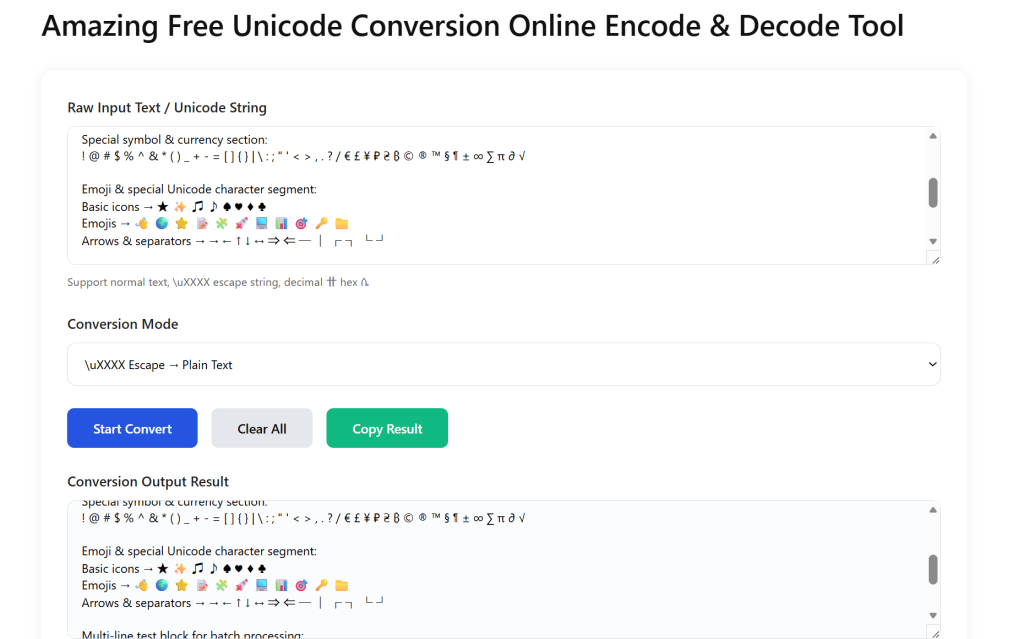
Step1 Paste raw content for upcoming this online utility
Fill your source text into top input box before starting Unicode Conversion: original plain sentences, scattered emoji icons or existing \u formatted Unicode codes are all acceptable for this online utility engine. Multi-line bulk text is also supported, the tool auto-sorts line breaks ahead of of coding converter.
When you need entity coding after text encoding, open matching resource: HTML Entity Conversion Tool to finish follow-up processing after text encoding completes.
Step2 Set parameters before triggering this online utility
Choose conversion direction: plaintext-to-Unicode or Unicode-decode-to-text for your targeted coding converter, tick “add \u prefix” if your code project needs standard formatted result for this text coding
Step3 Generate & copy result after Text Encoding
Tap convert button to launch instant this online utility, finished content appears on bottom output box instantly, click copy icon to save converted content after each text encoding. Clear button resets all input data to prepare next round of this online utility.
We test our text encoding tool speed against mainstream overseas platform U2 Unicode Converter , our Unicode Conversion runs faster in bulk data processing.
Practical Tips + Advanced Feature Access For Text Encoding Tool
• Troubleshooting Tips For Abnormal Coding Converter
Split ultra-long text into small chunks when rare ancient words cause failed coding converter avoid loading full paragraph in single text encoding task.
If you need URL parameter encryption after coding converter visit our matched service: URL Encode Decode Tool , widely paired with his online utility for web backend development.
• Advanced Function Unlock Area
Enter the exclusive unlock password below in the input box to get unlimited bulk export and unlimited-length text coding advanced privileges. The exclusive access password is: AccessCode-UniCode2025Pro