Table of Contents
If you’re a developer, web admin, or anyone who handles file verification and data encryption daily, a reliable md5 hash generator online is one utility you cannot live without. Many people struggle with bulky desktop software or confusing command line tools just to get a simple MD5 checksum, and that’s exactly where our free online MD5 hash calculator solves every common frustration.
Common Pain Points Users Face Without A Simple MD5 Hash Generator
1. Command line MD5 tools are too technical for casual users
Most operating systems include native MD5 calculation commands, but they require remembering exact syntax. Beginners often mistype terminal prompts, waste 10+ minutes searching for correct commands, and still fail to generate valid md5 hash strings for their text or files.
2. Desktop MD5 software requires installation & storage space
Many standalone MD5 checksum apps force you to download installers, grant system permissions, and update software regularly. If you switch between laptops or work on a shared public computer, you cannot access your MD5 tool at all times.
3. Random third-party MD5 tools leak your private input data
A huge hidden risk with other md5 hash generator online websites is server-side data logging. Some platforms store every text snippet and uploaded file you submit, exposing sensitive passwords, API keys, and confidential document content to unknown servers.
4. Separate tools for text MD5 and file MD5 slow down workflow
Most online MD5 calculators only support text input or single small file uploads. Developers have to jump between two different web pages to hash plain text strings and verify file checksums, creating unnecessary workflow delays every single day.
Core Advantages Of Our Free MD5 Hash Generator Online
1. Dual Function: Text Input & File Upload MD5 Checksum Calculation
Our md5 hash generator online combines two critical functions in one simple page. You can paste any length of plain text to instantly generate an MD5 hash string, or upload local documents to compute file MD5 checksums without switching tabs. This all-in-one design cuts your verification time in half compared to split competing tools.
2. Zero Installation, No Account Sign-Up Required
You never need to register an account, share your email, or download any software to use our MD5 hash generator. The entire utility runs directly inside your web browser. Open the page, input your text or upload a file, and copy your MD5 result within one second—no hidden paywalls or mandatory forms to fill out.
3. 100% Client-Side Processing, Zero Data Leak Risk
Every hash calculation runs locally on your device via browser JavaScript. Your text content and uploaded files never leave your computer, and our server never logs, stores, or scans any of your submitted data. This makes our md5 hash generator online safe for sensitive work data, private credentials, and internal project documents.
4. Instant One-Click Copy For Generated MD5 Checksum
After the tool computes your MD5 hash value, a dedicated copy button appears next to your result. Click once to copy the full 32-character MD5 string directly to your clipboard, eliminating manual text selection and accidental typos when moving the hash to your code or verification sheet.
5. Support Large Text Blocks & Multi-MB File Uploads
Unlike lightweight competitors that cap text input at a few hundred characters, our MD5 hash generator accepts long paragraphs, code snippets, and raw JSON blocks. For file verification, it supports documents up to 10MB, covering most common script files, images, and archive packages used by developers.
How To Use This MD5 Hash Generator Online (Step-by-Step Guide)
Method 1: Generate MD5 Hash For Plain Text
Step 1: Navigate to the text input box at the top of our md5 hash generator online page.
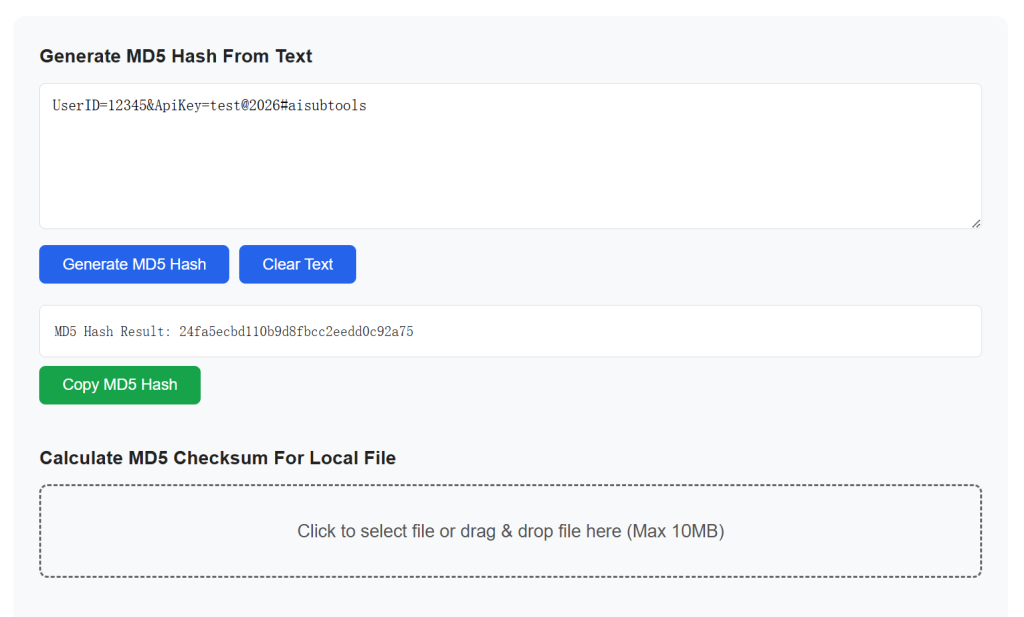
Step 2: Paste or manually type any text you want to convert to an MD5 checksum—this can be passwords, API strings, code lines, or written paragraphs.
Step 3: Click the blue “Generate MD5 Hash” button directly below the input field.
Step 4: Your unique 32-digit MD5 hash result will load instantly in the output box. Tap the “Copy Hash” button to save the value to your clipboard for later use.
Method 2: Compute MD5 Checksum For Local Files
Step 1: Scroll down to locate the file upload section of the MD5 hash generator tool.
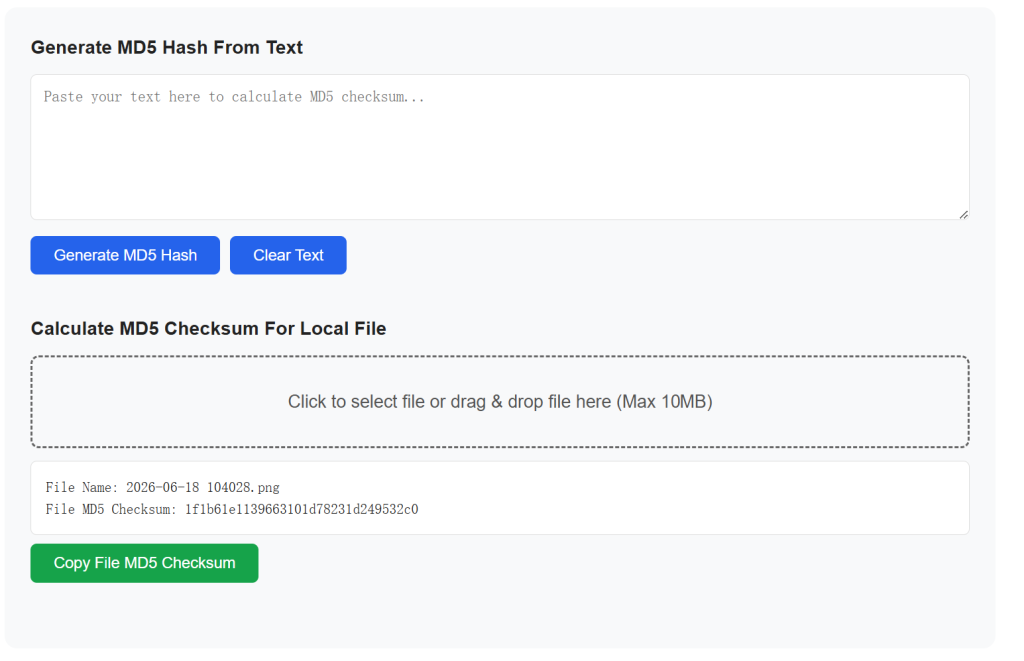
Step 2: Click the upload box and select any local file stored on your computer, or drag-and-drop the file straight into the upload zone.
Step 3: The browser will automatically read your file and calculate its unique MD5 checksum without sending data to external servers.
Step 4: Copy the output MD5 string to cross-check against official file hashes for integrity validation.
Common Real-World Scenarios For An MD5 Hash Generator Online
1. File Integrity Verification After Download
Developers and web admins rely on MD5 checksums to confirm downloaded files have not been corrupted or tampered with during transfer. Compare the MD5 hash from our tool against the official publisher’s published checksum to spot broken or modified packages instantly. If you regularly validate website asset files, our online image compressor pairs perfectly with this MD5 tool to audit optimized media file integrity.
2. Basic Data Obfuscation For Simple Credential Storage
Many small business developers use MD5 strings to store non-critical user text data without plaintext exposure. While MD5 is not recommended for high-security password storage, it works great for masking internal reference IDs and temporary access tokens. For stronger encryption needs, you can jump to our encrypt decrypt text tool for advanced symmetric text encoding.
3. Quick String Comparison For Backend Debugging
When debugging API responses or database entries, generating matching MD5 hashes for two text blocks lets you instantly confirm if two strings are identical. This lightweight check removes the need to manually compare thousands of lines of code character by character.
4. Offline Work Without Terminal Access
When working on locked-down office computers, school devices, or public laptops that block command prompt access, our browser-based md5 hash generator online acts as a portable replacement for system MD5 terminal commands. No admin permissions or software installs are required to run full MD5 calculations anywhere you have internet access.
Frequently Asked Questions About Our MD5 Hash Generator Online
Is this MD5 checksum tool completely free with no hidden limits?
Yes, our md5 hash generator online has zero usage caps, no paywalls, and no mandatory subscriptions. You can generate unlimited text and file MD5 hashes every single day with zero cost.
Are my uploaded files and text saved on your web server?
Absolutely not. All MD5 hash logic runs client-side inside your browser. We never receive, store, or log any input text or uploaded file content processed through this tool.
Can I trust MD5 hashes for secure password protection?
MD5 cryptography is outdated and vulnerable to collision attacks, so we do not suggest using MD5 alone to store sensitive user login passwords. For production-grade password security, research SHA-256 hashing standards or browse security guides on trusted developer platforms like MDN Web Security Docs.
What file types work with the file MD5 checksum calculator?
Our file upload MD5 function supports every standard file format, including TXT, JSON, PNG, JPG, ZIP, JS, CSS, PDF, CSV, and Markdown documents, with a maximum single file size of 10MB.
What is MD5 hash mainly used for?
MD5 is most commonly used for file integrity verification. After downloading files, you can compare the generated MD5 checksum with the official value to confirm the file hasn’t been corrupted, tampered with, or damaged during transmission.
Can I generate MD5 for plain text directly without uploading files?
Yes. The MD5 hash generator online tool provides two independent modes: text hash generator and file checksum calculator. Simply paste any string, paragraph, or code snippet to instantly get its MD5 value, no file upload required.
Can I copy the generated MD5 hash with one click?
All output MD5 strings come with a one-click copy button. You can quickly copy the 32-character hash to paste into verification scripts, log files, or server configuration panels.
Does this tool work on mobile phones, tablets and all browsers?
The MD5 hash generator online is fully responsive. It runs locally on Windows, Mac, Android and iOS devices, compatible with Chrome, Firefox, Edge, Safari and all modern mainstream browsers.
What if my file exceeds the 10MB upload limit?
For files larger than 10MB, the browser local computation will be slow or fail. We recommend splitting large archives or using local desktop MD5 tools to calculate checksums for oversized files.
Can I generate MD5 for multiple files in one batch?
Currently, single-file calculation is supported for stable local browser processing. Batch multi-file MD5 generation is in development for future updates.
Generate MD5 Hash From Text
Calculate MD5 Checksum For Local File
Final Words On Our MD5 Hash Generator Online
A fast, private md5 hash generator online is an essential lightweight utility for every web developer, system admin, and content creator. Our all-in-one text and file MD5 checksum calculator eliminates the most annoying pain points of competing MD5 tools, including forced installs, data logging, split workflows, and complex command line syntax.
Bookmark this page for instant access whenever you need to generate an MD5 hash string for text or verify file integrity on any device. For more developer-focused online utilities, browse our full library of free web tools including JSON formatters, Base64 encoders, and random password generators right from our homepage.