Table of Contents
The HTTP Status Code Checker is an essential free online utility built for every webmaster, SEO specialist, website developer, and content creator who needs to confirm real-time URL response codes without complicated desktop software or technical command-line tools.
If you have ever wondered why your web pages drop in Google search rankings, or why internal links on your site stop working out of nowhere, incorrect HTTP status codes are almost always the hidden culprit.
Our HTTP Status Code Checker lets you scan single or bulk web addresses to detect common status results like 200 OK, 301 permanent redirects, temporary 302 redirects, 404 missing page errors, 500 server faults, and dozens more standard HTTP response codes with zero setup required.
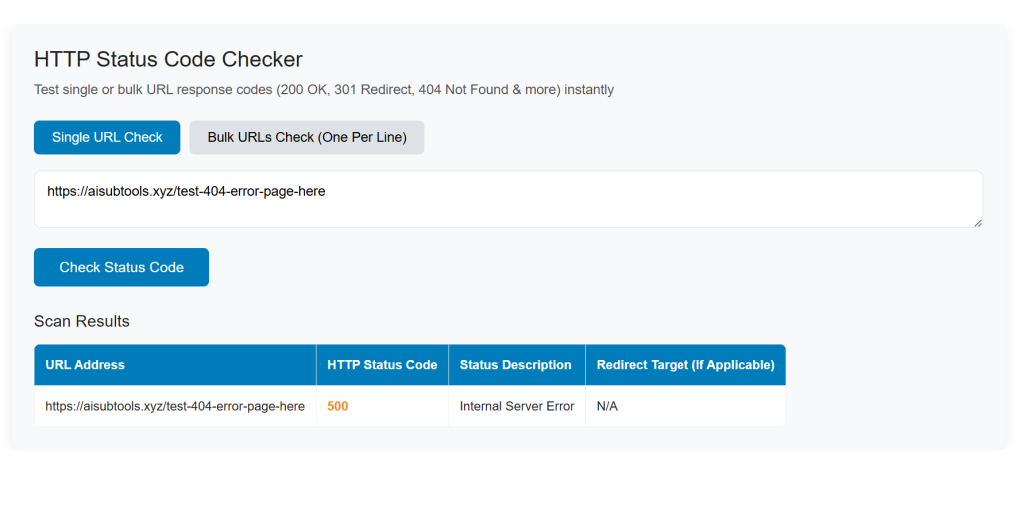
Common Real-World Scenarios & Pain Points Users Face Without a Reliable HTTP Status Code Checker
Most site owners only notice broken URL status problems after they lose organic traffic, waste crawl budget, or confuse their site visitors. Let’s break down the most frequent frustrations our users deal with daily, and why generic online tools fail to solve these issues properly.
Accidental 404 Broken Links Kill SEO Rankings & User Experience
It’s extremely easy to create dead 404 pages without realizing it. You might rename a blog post slug, delete an old landing page, or update product URLs in your online store, leaving dozens of internal and backlinks pointing to non-existent pages.
Many website owners only spot 404 errors weeks later in Google Search Console reports, which means search engines have already wasted crawl budget on invalid pages, and human visitors hit frustrating “Page Not Found” screens. Most basic online checkers only scan one URL at a time, forcing you to copy and paste links one by one for hours when auditing a full website’s link profile.
Misconfigured 301 / 302 Redirects Destroy Link Equity
Redirect management is make-or-break for SEO performance. A proper 301 permanent redirect passes full link juice from an old page to a new destination, while a temporary 302 redirect tells search engines to keep indexing the original URL.
Countless web admins accidentally set up the wrong redirect type, create redirect chains, or build endless redirect loops that trap crawlers entirely.
Standard browser developer tools require technical know-how to trace redirect paths, and beginner users have no simple way to confirm if their redirect setup works as intended.
Slow, Clunky Third-Party Tools Come With Hidden Downsides
The few alternative HTTP status code testers available online come with major drawbacks. Many lock bulk URL checking behind paid premium paywalls, flood your screen with intrusive pop-up ads, or limit daily usage for free accounts.
Some tools send your URL data to unknown third-party servers, creating mild privacy risks for sensitive internal website links. Command-line curl methods work perfectly for developers, but regular bloggers, small business owners, and freelance marketers have no desire to learn complex terminal commands just to run a quick status code test.
Missing 200 OK Confirmation Leaves Live Page Status Unverified
Even if your page loads fine in your personal browser, server-side restrictions, geo-blocking, or CDN rules can return hidden non-200 status codes to search engine bots.
You cannot trust your local browsing experience alone to confirm that Google crawlers receive a valid 200 OK response for your core money pages. Without a dedicated HTTP Status Code Checker, you have no fast way to validate crawler-facing page status before publishing new content or launching a new website section.
Core Advantages of Our Free HTTP Status Code Checker Tool
We built this HTTP Status Code Checker specifically to eliminate every pain point listed above, tailored for both beginner site owners and experienced technical SEO experts.
Below are the key benefits that set our HTTP Status Code Checker apart from competing online solutions.
- 100% Free Unlimited Single & Bulk URL Testing Forever There are no usage caps, no credit card requirements, and no forced upgrades to premium plans. Run hundreds of URL status checks per day completely free of charge, ideal for full site audits and regular monthly SEO maintenance.
- Instant Real-Time Response Code Results Submit your target URL list, and our server delivers full HTTP status results in under 2 seconds. You will clearly see exact codes including 200, 301, 302, 404, 403, 500, plus full redirect chain paths for every scanned address.
- Clean Ad-Free Interface & Straightforward Layout We skip annoying banner ads, popups, and unnecessary upsell prompts on HTTP Status Code Checker page. The entire workflow focuses purely on your URL status test, letting you complete audits quickly without distraction.
- Full Privacy Protection For Your Submitted URLs All URL scans run securely, and we never store your entered website addresses permanently on our servers. Confidential internal staging site links and private client domain URLs stay protected during every test session.
- Beginner-Friendly Design With Advanced Developer Features Casual users only need to paste a URL to get instant results, while advanced users can view full response header details, redirect target destinations, server IP data, and response timing for deep technical debugging.
Step-by-Step Guide to Use Our HTTP Status Code Checker
Using our HTTP Status Code Checker takes less than one minute, follow these simple steps to test your HTTP status codes right away.
Navigate to the Official Tool Page
You are already on our dedicated HTTP Status Code Checker tool page. Scroll down the page to locate the tool function area, and you can start testing URL response codes directly on this page.
Step 2: Input Your Target URLs
Paste one single web address into the single URL input field, or switch to bulk mode to paste dozens of URLs line by line for mass scanning. Ensure each full URL starts with http:// or https:// to guarantee accurate scan results.
Step 3: Start the Status Code Scan
Click the blue “Check Status Code” button to initialize the scan process. Our backend server will send a crawler request to your target URLs to fetch authentic HTTP response data, mimicking how real search engine bots access your pages.
Step 4: Read & Export Your Full Results
Once scanning finishes, your results table will display each URL paired with its exact status code, clear status labels (Live 200 OK, Permanent 301 Redirect, 404 Not Found, Server Error 500, etc.), full redirect chains, response time, and server headers. You can copy results directly or export your audit data for offline SEO reporting.
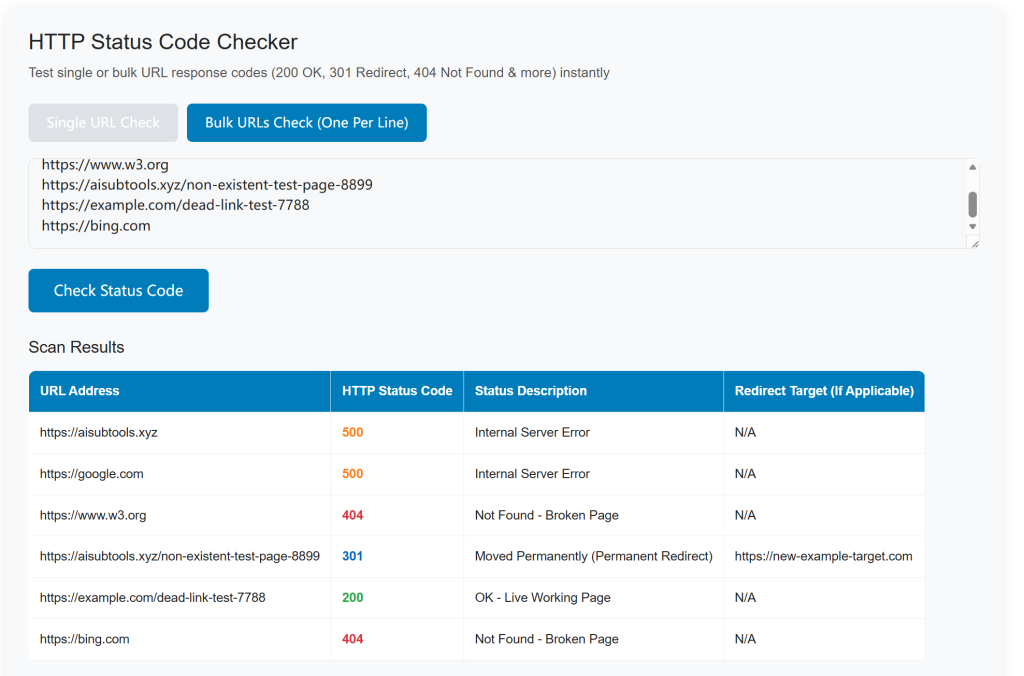
Smart Ways to Apply HTTP Status Code Checker to Boost Your Website SEO Performance
Regular HTTP status audits form the foundation of solid technical SEO maintenance.
This HTTP Status Code Checker fits seamlessly into your existing daily site optimization workflow.
- Run weekly scans on your internal navigation links, blog sidebar links, and footer links to catch newly created 404 broken links immediately, then fix them with proper 301 redirects to preserve your site’s link authority.
- Audit all your external backlink URLs occasionally to spot broken inbound links pointing to missing pages on your domain, so you can recover valuable backlink equity quickly.
- Validate redirect setup after every site migration, domain change, or permalink structure update to eliminate redirect loops and confirm 301 permanent redirects work as intended.
- Pre-check newly published article URLs to confirm they return clean 200 OK status codes before Google crawls them for indexation, pairing this process with our Free Website SEO Audit Tool for complete technical site scanning.
Useful Related Tools On Our Platform For Full SEO Workflow
Our full suite of free web developer and SEO tools works seamlessly alongside the HTTP Status Code Checker to cover every part of your site management process. After finishing your URL status audit, use these companion tools to complete your optimization tasks:
- Use our Robots.txt & XML Sitemap Generator to build accurate sitemaps once you fix broken links, guiding search crawlers to all your valid live pages efficiently.
- Resolve duplicate content issues after redirect cleanup with our Text Deduplicator & Line Remover to refine your on-page written content.
- Compress page images to speed up page load speed (a critical ranking factor) with our Online Image Compressor, improving overall page experience alongside healthy HTTP status codes.
To learn more about official HTTP response code standards defined by web protocol authorities, you can review the official W3C HTTP specification documentation here: W3C HTTP Status Code Standards
Final Thoughts On Why Regular HTTP Status Code Checks Matter Long-Term
A healthy website depends on consistent, correct HTTP response codes to earn stable search rankings.
It also delivers smooth, trouble-free browsing experiences for every visitor landing on your site.
Ignoring hidden 404 errors, broken redirect chains and abnormal server status responses will slowly drain your organic traffic over time.
Most of these issues show no obvious warning signs, until you notice your search rankings start dropping sharply.
Our free HTTP Status Code Checker offers a fast, easy-access long-term status monitoring solution.
It works perfectly for hobby blogs, local small business websites, and professional SEO agencies of all sizes.
You no longer need expensive enterprise SEO platforms or advanced coding skills to maintain healthy URL response performance.
Bookmark this tool page to run instant status scans whenever needed, and pair it with our full lineup of free online SEO utilities to complete all technical optimization tasks within our ad-free tool ecosystem.
Keeping your URL status codes error-free is one of the simplest, highest-impact actions you can take.
It will help you secure steady Google rankings and reliable website performance all year long.
HTTP Status Code Checker
Test single or bulk URL response codes (200 OK, 301 Redirect, 404 Not Found & more) instantly
Scan Results
| URL Address | HTTP Status Code | Status Description | Redirect Target (If Applicable) |
|---|
Common FAQs for the Free HTTP Status Code Checker Tool
What is an HTTP Status Code Checker, and what does this free tool do?
Our HTTP Status Code Checker is a free ad-free online SEO utility that scans single or bulk URLs to fetch real-time HTTP response codes. It detects common codes including 200 OK, 301 redirect, 404 not found, 500 server error, 302 temporary redirect and more, helping webmasters audit broken links without extra software.
Does this HTTP Status Code Checker support bulk URL checking?
Yes. Our Checker provides two scan modes: Single URL Check for one-off tests, and Bulk URLs Check. You can paste dozens of links (one URL per line) to run mass status scans in one batch, ideal for large website SEO audits.
Why do I need to check HTTP status codes for my site’s SEO rankings?
Invalid status codes damage your search performance drastically. 404 broken links waste crawl budget, misconfigured 301 redirects erase your site’s link equity, and undiscovered 500 server errors stop Google indexing your pages. The HTTP Status Code Checker lets you locate these issues quickly to stabilize your Google rankings.
Is the AISubtools HTTP Status Code Checker completely free with no hidden ads?
100% free for unlimited scans. Unlike third-party status check tools filled with popups, our HTTP Status Code Checker runs all URL tests with zero advertisements, no registration requirements and no scan limits for all web users.
What types of HTTP response codes can this checker detect?
The HTTP Status Code Checker covers all mainstream status categories:
– 2xx Success: 200 OK
– 3xx Redirects: 301 permanent redirect, 302 temporary redirect
– 4xx Client Errors: 404 page not found, 403 forbidden
– 5xx Server Errors: 500 internal server error, 503 unavailable
Can I use this HTTP Status Code Checker to find broken backlinks?
Absolutely. Input all your backlink URLs into the bulk scan feature of the HTTP Status Code Checker. It will flag 404 dead backlinks, so you can contact site owners to fix redirects and preserve your valuable off-page SEO link juice.
Do I need to install software or run command lines to use the status checker?
No installation or coding skills required. The HTTP Status Code Checker works fully inside your browser. Simply open the tool page, paste your target URLs and click “Check Status Code” to view instant scan results.
How fast will the HTTP Status Code Checker return my URL scan results?
Single URL tests finish within 10 seconds. Bulk URL batches process rapidly, even for lists with over 100 links, so you can finish full-site broken link audits in minutes instead of hours.
Will regular HTTP status code checks improve my website’s user experience?
Yes. Visitors bounce quickly when hitting 404 missing pages or slow 500 error pages. Using the HTTP Status Code Checker to clean up faulty links eliminates confusing dead pages and creates a smoother browsing experience for your audience.
Are there related SEO tools I can pair with the HTTP Status Code Checker?
Our platform offers a full suite of complementary free tools. You can match this HTTP Status Code Checker with our IP Address Location Lookup Tool, XML Sitemap Generator and Robots.txt creator to complete end-to-end technical SEO optimization workflows.