Table of Contents
Common Pain Points of Converting Markdown to HTML
If you regularly write technical blogs, documentations or website articles, you must have run into annoying formatting troubles when publishing Markdown content online. Most mainstream website platforms, including WordPress and static site CMS, only accept standard HTML code for formal content release.
When you directly paste raw Markdown text onto web pages, all kinds of layout errors will pop up without warning. Common issues include broken multi-level headings, disordered ordered and unordered lists, collapsed data tables, and unrecognizable code blocks. Fixing these messy format problems one by one manually will waste a huge amount of your valuable content creation time, dragging down your publishing efficiency severely.
Traditional Markdown conversion tools also bring lots of extra troubles that disrupt your workflow. Most desktop conversion software is bulky, needs tedious installation steps and takes up local storage space on your computer. Many competing online Markdown to HTML converters force users to register accounts and log in before using core functions.
Worse still, these platforms require you to upload all private draft content to remote servers to finish conversion, which brings serious potential data leakage risks and unfair usage restrictions like daily conversion caps or slow processing speeds.
To completely solve all these common troubles faced by content creators and developers, we built this lightweight Markdown to HTML converter. It supports fast format conversion for all standard Markdown content, helping you streamline website development and daily content publishing work.
As an extra workflow helper for technical staff, our Unix timestamp converter can assist you in handling complex time format conversion efficiently during API debugging and backend development.
Markdown to HTML Converter Introduction
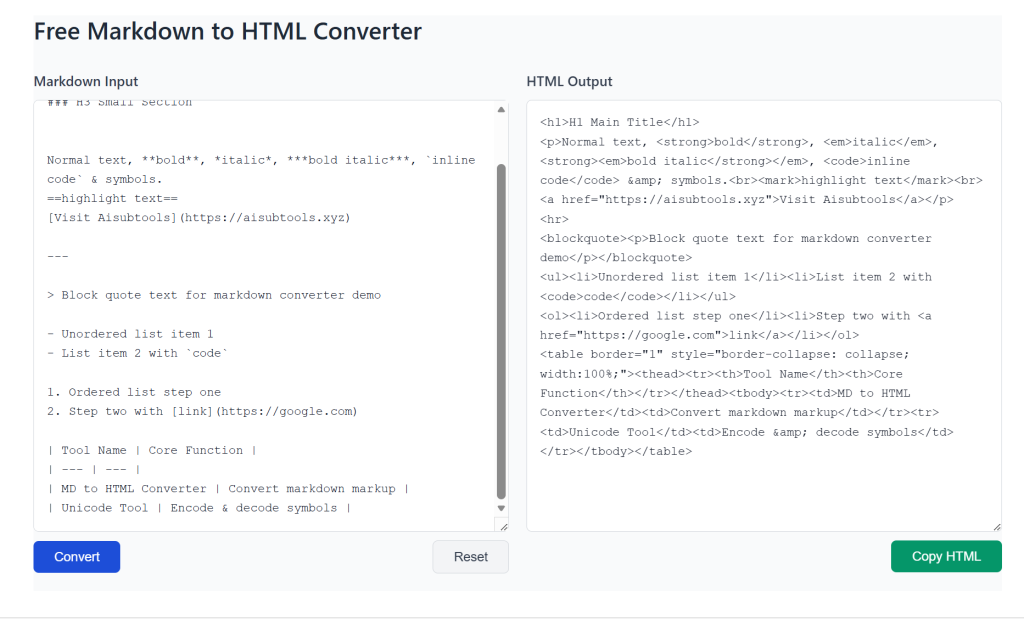
Our Markdown to HTML converter is a free, instant online tool dedicated to converting complete Markdown syntax into clean, standard HTML code. Whether you are writing long blog posts, professional technical documentation, or formal publishing content, this Markdown to HTML converter guarantees accurate, lossless conversion results every single time.
It adopts optimized syntax parsing logic and concise output structure, delivering a smooth, fast editing experience for daily writing and documentation sorting tasks.
This online Markdown to HTML Converter is 100% free, ad-free and privacy-focused web utility, specially developed for web publishers, technical writers and website administrators. The tool fully supports standard GFM GitHub Flavored Markdown syntax.
It can accurately identify and parse all mainstream Markdown elements, including multi-level headings, bold text, italic content, ordered & unordered lists, data tables, embedded images, hyperlinks and multi-line code blocks.
All conversion calculations of this tool run locally inside your personal browser, and none of your writing drafts or private content will be uploaded, stored, logged or monitored by any external server.
This local processing mechanism ensures absolute privacy and complete data security for every user who uses our Markdown to HTML converter.
The HTML code exported by our Markdown to HTML converter is clean, W3C-standardized and free of redundant messy inline styles. You can directly copy and use the generated HTML code on WordPress personal blogs, enterprise document websites and all kinds of CMS platforms without extra modification.
There are no hidden usage limits, speed throttles or mandatory hidden charges in our converter, and you can process unlimited Markdown articles every day at zero cost.
For professional web standard knowledge to optimize your published content, you can check official MDN HTML documentation to lift your web publishing quality.
How to Use the Markdown to HTML Converter
Our Markdown to HTML converter adopts ultra-simple one-click operation design, friendly for absolute beginners and senior developers alike. The complete conversion workflow only contains four clear steps.
First, input or paste your finished Markdown writing content into the left input box of the converter. The tool fully supports long articles, multi-segment technical code segments and mixed-format content with tables and images.
Second, double-check your Markdown content to confirm all paragraphs are complete and there is no missing syntax or broken text. Third, click the one-click convert button to start instant local syntax parsing.
The system will automatically identify all Markdown structures and convert them into standard, valid HTML code. Clean formatted HTML results will display instantly in the right output field of the Markdown to HTML converter.
Fourth, click the copy button to copy all converted HTML content within one second. You can paste the copied HTML code directly into your website editor for formal publishing, then preview the live page to confirm all styles, tables and layouts display normally.
The whole conversion process takes only a few seconds and greatly improves your daily publishing speed. Every function of this Markdown to HTML converter is designed with user experience in mind, making every conversion task fast and straightforward without complicated settings.
Free Markdown to HTML Converter
Key Features of Our Markdown to HTML Converter
100% Local & Secure: All conversions of the tool happen directly in your browser. No content is uploaded to external servers, keeping your private notes, confidential drafts and internal document content completely safe from data leaks.
No Signup Required: Skip all tedious registration and login processes. Just paste your Markdown code into the tool and get instant HTML output in seconds.
Clean & Standard Code: The Markdown to HTML converter produces well-formatted, W3C-compliant HTML code without extra redundant styles, ready for direct publishing on websites, personal blogs, or mainstream CMS platforms.
Full Support for Common Markdown Syntax: It stably handles headings, ordered/unordered lists, hyperlinks, embedded images, tables, quote blocks and multi-line code blocks, ensuring your content renders correctly after conversion every time.
Whether you are a part-time blogger, frontend developer, college student, or full-time content creator, this converter helps you save hours of working time and avoid repetitive common formatting errors that come with manual Markdown-to-HTML conversion.
Frequently Asked Questions
Is this Markdown to HTML converter completely free to use? Are there hidden fees or conversion limits?
Our tool is 100% permanently free for all users. There are no daily conversion caps, speed limits, premium paywalls or hidden charges. You can convert unlimited Markdown articles anytime without extra cost.
Will my Markdown drafts be uploaded and saved on your server when using the Markdown to HTML converter?
Absolutely not. All parsing and conversion logic of the Markdown to HTML converter runs locally inside your browser. Your input Markdown text never leaves your device, and we never receive, store or log any of your private writing content. Your drafts stay fully confidential.
Do I need to register an account or log in before using the Markdown to HTML converter?
No registration, email sign-up or login is required at all. Open the converter page, paste your Markdown content and start conversion immediately without submitting any personal information.
What Markdown syntax can this Markdown to HTML converter recognize and convert?
This tool fully supports GFM GitHub Flavored Markdown, including multi-level headings, bold, italic, lists, tables, links, images, block quotes and multi-line code blocks. All mainstream writing syntax will be converted to matching standard HTML accurately.
Can the generated HTML code be used directly on WordPress and other blog platforms?
Yes. The HTML output from our Markdown to HTML converter follows official W3C standards with no messy extra styles. You can copy the code and paste it directly into WordPress, static site editors and all common CMS publishing panels.
Does this Markdown to HTML converter work on mobile phones, tablets and all modern browsers?
The Markdown to HTML converter adopts fully responsive layout. It runs smoothly on Windows, Mac desktops, Android phones and iOS iPhones, compatible with Chrome, Firefox, Edge, Safari and all mainstream modern browsers.